Older Version
Newer Version
 Alyce
Nov 4, 2006
Alyce
Nov 4, 2006
Lesson Map | Next > Get User Input
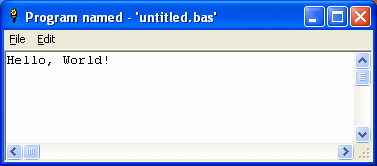
The mainwin is just a text window, with no graphics, no icons, no fancy fonts, no drop-down list boxes. In other words, the mainwin has no distractions, so you can concentrate on programming and leave the fancy window enhancements for later.
You will soon find out that you can do some serious computer work -- even play games! -- in the text world of the mainwin.
Lesson Map | Next > Get User Input
Mainwin Basics
Since this is a basic, elementary introduction to programming, you'll be using a basic, elementary display -- the mainwin -- for running your programs. The mainwin is just a text window, with no graphics, no icons, no fancy fonts, no drop-down list boxes. In other words, the mainwin has no distractions, so you can concentrate on programming and leave the fancy window enhancements for later.
You will soon find out that you can do some serious computer work -- even play games! -- in the text world of the mainwin.
Lesson Map | Next > Get User Input