 JanetTerra
May 21, 2006
JanetTerra
May 21, 2006
May 21, 2006 -  JanetTerra
A window opened for graphics automatically includes both a vertical and a horizontal scrollbar. Scrollbars are useful when a larger image is being used in a smaller space. The user simply scrolls to the desired area. This small snippet illustrates both a regular window and a graphics window.
There may be times when either or both scrollbars are better left off the graphics window. Perhaps a displayed graphic is narrow. To remove the horizontal scrollbar, use the command
You can, if you wish, define the amount of the area to scroll. This is done by including the optional minimum and maximum values in the scrollbar display.
full short demo using the optional minimum and maximum values
(caption. (caption). To compensate for this
If the final visible width desired is 1000, then use the value
A graphicbox imbedded into a regular window lacks scrollbars. Graphics drawn or loaded beyond the viewing area of the graphicbox can not be seen. Scrollbars can be added to the graphicbox. The graphicbox now has the same functionality as the graphics window. A graphicbox, like a graphics window, loses pixels to scrollbars and window borders. Unlike a graphics window, though, the caption height is not a factor.
Drawing to and then scrolling a graphics window or graphicbox will eventually reveal blurring. The effects of this bug can be minimized by drawing a Boxfilled image rather than using the Fill command. Be sure the lower right corner defined by the Boxfilled command extends beyond the maximum pixel points viewed.
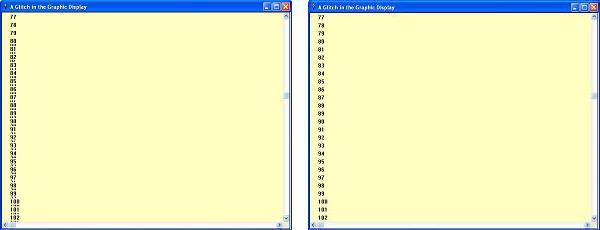
Using a Boxfilled image to minimize the glitch (Left image shows glitch :: Right image glitch is minimized)
The Horizscrollbar and Vertscrollbar commands require Liberty BASIC version 4.0 or later .
JanetTerra Graphic Windows and Scrollbars
A window opened for graphics automatically includes both a vertical and a horizontal scrollbar. Scrollbars are useful when a larger image is being used in a smaller space. The user simply scrolls to the desired area. This small snippet illustrates both a regular window and a graphics window.
 Nomainwin
 WindowWidth = 300
 WindowHeight = 400
 UpperLeftX = 50
 UpperLeftY = 50
 Open "A Regular Window" for Window as #w
 Print #w, "Trapclose [EndDemo]"

 UpperLeftX = Int(DisplayWidth/2) + 50
 Open "A Graphics Window" for Graphics as #g
 Print #g, "Trapclose [EndDemo]"

 Wait

 [EndDemo]
 Close #w
 Close #g
 End
Removing One or Both Scrollbars
There may be times when either or both scrollbars are better left off the graphics window. Perhaps a displayed graphic is narrow. To remove the horizontal scrollbar, use the command
Print #g, Horizscrollbar Off"A short but wide graphic display may require removing the vertical scrollbar with
Print #g, "Vertscrollbar Off"This demo turns the horizontal and vertical scrollbars on and off. Left click anywhere in the graphics window to show or hide the scrollbars.
 Nomainwin
 WindowWidth = 800
 WindowHeight = 600
 UpperLeftX = Int((DisplayWidth - WindowWidth)/2)
 UpperLeftY = Int((DisplayHeight - WindowHeight)/2)

 Open "Showing and Hiding Scrollbars in a Graphics Window" for Graphics as #g
 Print #g, "Trapclose [EndDemo]"
 ' Toggle Count ( Odd = Off, Even = On)
 toggleCount = 0
 ' Draw some graphics
 Print #g, "Down; Fill Black"
 Print #g, "Color Black; Backcolor Green"
 For y = 0 to 700 Step 100
 For x = 0 to 900 Step 100
 Print #g, "Place ";x;" ";y
 Print #g, "Boxfilled ";x + 100;" ";y + 100
 Print #g, "Place ";x + 10;" ";y + 60
 Print #g, "\";x / 100;" - ";y / 100
 Next x
 Next y
 Print #g, "Flush"
 Print #g, "When leftButtonUp [ToggleScrollbarsOnOff]"

 [ToggleScrollbarsOnOff]
 xPos = MouseX
 yPos = MouseY
 toggleCount = toggleCount + 1
 If toggleCount / 2 = Int(toggleCount / 2) Then ' If even
 Print #g, "Horizscrollbar Off"
 Print #g, "Vertscrollbar Off"
 msg$ = "Left Click to See Scrollbars"
 Else ' If toggleCount is odd
 Print #g, "Horizscrollbar On"
 Print #g, "Vertscrollbar On"
 msg$ = "Left Click to Hide Scrollbars"
 End If
 Print #g, "Place ";xPos + 20;" ";yPos + 20
 Print #g, "\";msg$
 Print #g, "Discard"
 Wait

 [EndDemo]
 Close #g
 End
Controlling the Size of the Displayed Area
You can, if you wish, define the amount of the area to scroll. This is done by including the optional minimum and maximum values in the scrollbar display.
Print #g, "Horizscrollbar On 0 800"A
Print #g, "Vertscrollbar On 0 600"
NomainwinNotice that the maximum value is not the maximum pixel displayed against the right or bottom border. Rather, it is the pixel value of the upper left corner. Setting the Horizscrollbar maximum value to 800 displays those 800 pixels, plus the window width amount, minus the widths of the border and vertical scrollbar. Likewise, setting the Vertscrollbar maximum value to 600 displays 600, plus the window height amount, minus the width of the window border and the horizontal scrollbar. The defined window height also includes the titlebar
WindowWidth = 800
WindowHeight = 600
UpperLeftX = Int((DisplayWidth - WindowWidth)/2)
UpperLeftY = Int((DisplayHeight - WindowHeight)/2)
Open "Showing and Hiding Scrollbars in a Graphics Window" for Graphics as #g
Print #g, "Trapclose [EndDemo]"
' Draw some graphics
Print #g, "Down; Fill Black"
Print #g, "Color Black; Backcolor Green"
For y = 0 to 700 Step 100
For x = 0 to 900 Step 100
Print #g, "Place ";x;" ";y
Print #g, "Boxfilled ";x + 100;" ";y + 100
Print #g, "Place ";x + 10;" ";y + 60
Print #g, "\";x / 100;" - ";y / 100
Next x
Next y
Print #g, "Flush"
Wait
[EndDemo]
Close #g
End
- Determine the maximum value
- Substract the width (or height) of the window
- Add 25 to the width or 50 to the height
- Use the final number for the maximum value
If the final visible width desired is 1000, then use the value
hScrollWidth = 1000 - 800 + 25Do the same for the final visible height of 800
vScrollHeight = 800 - 600 + 50These values are now used for the optional max parameters in the scrollbar commands. Remember to keep variables outside of quotation marks.
Print #g, "Horizscrollbar On 0 ";hScrollWidthThe same demo, this time using the optional minimum and maximum values
Print #g, "Vertscrollbar On 0 ";vScrollHeight
NomainwinThe values 25 and 50 are approximate and should work in most instances. If you absolutely need to know the exact number of pixels lost to the borders, scrollbars and caption, use the #user32 API call to GetSystemMetrics .
WindowWidth = 800
WindowHeight = 600
UpperLeftX = Int((DisplayWidth - WindowWidth)/2)
UpperLeftY = Int((DisplayHeight - WindowHeight)/2)
hScrollWidth = 1000 - 800 + 25
vScrollHeight = 800 - 600 + 50
Open "Showing and Hiding Scrollbars in a Graphics Window" for Graphics as #g
Print #g, "Trapclose [EndDemo]"
 Print #g, "Horizscrollbar On 0 ";hScrollWidth
 Print #g, "Vertscrollbar On 0 ";vScrollHeight
' Draw some graphics
Print #g, "Down; Fill Black"
Print #g, "Color Black; Backcolor Green"
For y = 0 to 700 Step 100
For x = 0 to 900 Step 100
Print #g, "Place ";x;" ";y
Print #g, "Boxfilled ";x + 100;" ";y + 100
Print #g, "Place ";x + 10;" ";y + 60
Print #g, "\";x / 100;" - ";y / 100
Next x
Next y
Print #g, "Flush"
Wait
[EndDemo]
Close #g
End
Adding a Scrollbar to a Graphicbox
A graphicbox imbedded into a regular window lacks scrollbars. Graphics drawn or loaded beyond the viewing area of the graphicbox can not be seen. Scrollbars can be added to the graphicbox. The graphicbox now has the same functionality as the graphics window. A graphicbox, like a graphics window, loses pixels to scrollbars and window borders. Unlike a graphics window, though, the caption height is not a factor.
NomainwinIf you want to control the amount of visible scrolled space, use the same technique as with a graphics window.
WindowWidth = 730 ' Allow an extra 30 pixels for borders and scrollbar
WindowHeight = 450 ' Allow an extra 50 pixels for caption, borders, scrollbar
UpperLeftX = Int((DisplayWidth - WindowWidth)/2)
UpperLeftY = Int((DisplayHeight - WindowHeight)/2)
Graphicbox #w.g, 0, 0, 700, 400
Open "A Graphicbox with Scrollbars" for Window as #w
#w, "Trapclose [EndDemo]"
#w.g, "Horizscrollbar On"
#w.g, "Vertscrollbar On"
'Draw some graphics in the graphicbox
#w.g, "Down; Fill Darkblue; Size 3"
For i = 1 to 1000
redHue = Int(Rnd(1) * 256)
greenHue = Int(Rnd(1) * 256)
blueHue = Int(Rnd(1) * 256)
#w.g, "Color ";redHue;" ";greenHue;" ";blueHue
x1 = Int(Rnd(1) * 2000)
y1 = Int(Rnd(1) * 1200)
lngth = Int(Rnd(1) * 50) + 25
x2 = x1 + lngth
y2 = y1 + Int(Rnd(1) * lngth) + 10
#w.g, "Line ";x1;" ";y1;" ";x2;" ";y2
#w.g, "Flush"
Next i
Wait
[EndDemo]
Close #w
End
A Glitch and a Workaround
Drawing to and then scrolling a graphics window or graphicbox will eventually reveal blurring. The effects of this bug can be minimized by drawing a Boxfilled image rather than using the Fill command. Be sure the lower right corner defined by the Boxfilled command extends beyond the maximum pixel points viewed.
 'Code to show the glitch

 WindowWidth = 730
 WindowHeight = 575

 UpperLeftX = Int((DisplayWidth - WindowWidth)/2)
 UpperLeftY = Int((DisplayHeight - WindowHeight)/2)

 Graphicbox #main.g, 0, 0, 720, 540

 Open "A Glitch in the Graphic Display" for Window as #main
 #main, "Trapclose [EndDemo]"

 #main.g, "Horizscrollbar On"
 #main.g, "Vertscrollbar On 0 4000"
 #main.gb, "Down; Fill 255 255 192; Backcolor 255 255 192"
 #main.g, "Color Black"

 n = 0
 For y = 20 to 4000 Step 20
 #main.g, "Place 20 ";y
 #main.g, "\";n
 n = n + 1
 Next y
 #main.g, "Flush"

 Wait

 [EndDemo]
 Close #main
 End
Using a Boxfilled image to minimize the glitch (Left image shows glitch :: Right image glitch is minimized)
To review, the default of the Liberty BASIC graphics window is scrollbars ON. The default of the Liberty BASIC graphicbox is scrollbars OFF. With the Liberty BASIC scrollbars command, you can decide when to show and when to hide these scrollbars.
 WindowWidth = 730
 WindowHeight = 575

 UpperLeftX = Int((DisplayWidth - WindowWidth)/2)
 UpperLeftY = Int((DisplayHeight - WindowHeight)/2)

 Graphicbox #main.g, 0, 0, 720, 540

 Open "A Glitch in the Graphic Display" for Window as #main
 #main, "Trapclose [EndDemo]"

 #main.g, "Horizscrollbar On"
 #main.g, "Vertscrollbar On 0 4000"
 #main.g, "Down; Color 255 255 192; Backcolor 255 255 192"
 #main.g, "Place 0 0; Boxfilled 3000 2800"
 #main.g, "Color Black"

 n = 0
 For y = 20 to 4000 Step 20
 #main.g, "Place 20 ";y
 #main.g, "\";n
 n = n + 1
 Next y
 #main.g, "Flush"

 Wait

 [EndDemo]
 Close #main
 End
The Horizscrollbar and Vertscrollbar commands require Liberty BASIC version 4.0 or later .