Older Version
Newer Version
 JanetTerra
Jul 22, 2006
JanetTerra
Jul 22, 2006
The Liberty BASIC Wire Frame Library
- steelweaver52
 Chapter 1: Introducing the Liberty BASIC Wire Frame Library
This introductory article originally appeared in the Liberty BASIC Newsletter, Issue #134. It is reprinted here with the permission of the author.
Introduction
The Liberty BASIC Wire Frame Library (LBWF Library) is a collection of functions which allow Liberty BASIC programmers to easily create and manipulate images of three-dimensional wire frame objects.
A wire frame object is an object whose edges are visible, but whose surfaces are transparent. A wire frame cube looks like a cube made from the wire of a coat hanger. See the screen capture below for a collection of wire frame objects made using the LBWF Library .
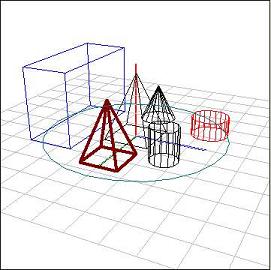
I've discussed 3D wire frame objects before. In particular, see Drawing in Memory in the Liberty BASIC Newsletter , Issue #113 , in which I discussed two functions called ScreenX() and ScreenY(). These two functions allowed a programmer to calculate the graphicbox coordinates of a point in space, given the point's spatial coordinates, the camera location, the direction in which the camera was pointed, and the zoom factor.
The LBWF Library goes way beyond ScreenX() and ScreenY() both in capabilities and ease of use ! With the Library, a programmer can create any number of primitive shapes in their entirety, each with a single function call. There is no need to keep track of lines and vertices. The Library functions will do all of that for the programmer.
The file package in the Issue #113 contains 13 example programs. The first 11 example programs (numbered 001 through 011) attempt to demonstrate a single function each. For the most part, each one builds a little bit on the previous example. Each example program also contains a full version of the library.
What Does LBWF Code Look Like?
The sample code provided below demonstrates how simple it will be to use the LBWF Library . In the example below, the camera and screen center are established. This is followed by a function to make sure the axes are visible. Next, a box is created. Following that, the box is moved in the minus x direction. Next, a cylinder is created. Finally, a function is called which draws all wire frame objects that have been created. The results can be seen in the screen capture following the code.
 'Create a camera location...
 CamX = 200 : CamY = 150 : CamZ = 150
 VCtrX = 0 : VCtrY = 0 : VCtrZ = 0 : ZoomFac = 1.20
 AAA = FF.LBWF.Camera(CamX, CamY, CamZ, VCtrX, VCtrY, VCtrZ, ZoomFac)

 'Set the screen center to a point of the graphicbox...
 ScreenCenterX = 200 : ScreenCenterY = 250
 AAA = FF.LBWF.ScreenCenter(ScreenCenterX, ScreenCenterY)

 'Show the axes when the objects are drawn...
 AAA = FF.LBWF.ShowAxes()

 'Create a box...
 xdim = 50 : zdim = 50 : boxheight = 80
 AAA = FF.LBWF.CreateBox("Box1", xdim, zdim, boxheight, "blue")

 'Move the box in the -x direction...
 AAA = FF.LBWF.TranslateObject("Box1", -70, 0, 0)

 'Create a cylinder...
 radius = 20 : numSides = 20 : cylheight = 20
 AAA = FF.LBWF.CreateCylinder("Cyl1", radius, numSides, cylheight, "red")

 'Clear the graphics box...
 AAA = FF.LBWF.ClearGraphicScreen()

 'Draw all objects...
 AAA = FF.LBWF.DrawAllObjects()
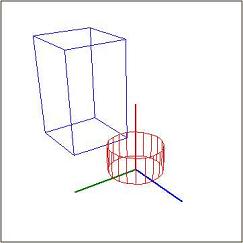
Wire Frame scene made using the the code above .
See? It couldn't be simpler!
Notes For Successful Use of The LBWF Library
Version 0.5 of the LBWF Library contains 23 functions. All of the functions are written using native Liberty BASIC code. Using the library will add about 1,200 additional lines to your programming project...but this will be code lines well spent! Additionally, the entire library is placed at the end of your code, so it is not intrusive in the body of your program despite its length.
Start your wire frame programming projects by opening the BASIC file, LBWF_template.bas . This file contains version 0.5 of the library; it sets up a graphicbox for the display of shapes; and it creates a single graphic object.
In addition, the programmer is advised to note the following:
Important Note About the LBWF Mathematics
The programmer needs to remember this when she positions the camera to view objects:**
**If the programmer places the camera in the midst of a group of objects, the program will not crash. Rather, the objects will simply render in a very unusual manner.
Let the Documentation Begin
In this linked article , I document twelve LBWF functions which will allow programmers to get started building their wire model scenes. More documentation will be provided in subsequent chapters of this series.In the current installment of the documentation, you will discover how to set up the viewing environment, create boxes and cylinders, draw objects which you have created, and turn the axes "on".
Sample Programs Included with the LBWF Library
A number of LBWF sample programs can be found in the zipped Issue #113 LB Newsletter archive . As mentioned above, LBWF_template.bas is a template that can be used as your starting point for any wire frame project. In addition to that, I've provided Move_Box.bas which is an animation of a box moving between two rows of objects. A screen capture of this sample program is given below.
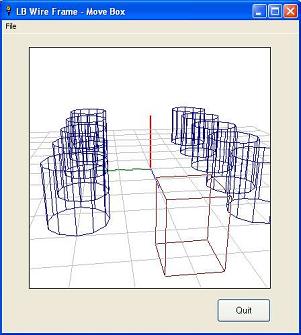
Moving a box between rows of objects.
Last, I'm providing 11 or so additional example programs, each of which will illustrate an LBWF function or two. These programs are numbered sequentially beginning with 001.
All the sample and example programs will contain the complete 0.5 Library.
What's Next For the Liberty BASIC Wire Frame Library ?
The LBWF Library has already grown beyond Version 0.5 released in this chapter. The next version will include more primitive objects, and will provide functions which will allow the user to query the system about the properties of existing objects. Additionally, new installments of the documentation will be provided until all LBWF functions are thoroughly explained. Continue to look for more examples, too.
Tom Nally
Steelweaver52@aol.com
Note: There were some minor editing changes made to this article from the original. These changes were made with the author's permission and do not alter the informational content of the article in any way. Specifically, references to future issues of the Liberty BASIC Newsletters were changed to refer to further chapters. These changes was made for the singular purpose of providing clarity and ease in navigating throughout these Liberty BASIC Programmer's Encyclopedia pages . - -
 JanetTerra