 robmcal
Jul 20, 2009
robmcal
Jul 20, 2009
OpenGL 3D Graphics in Liberty BASIC
Lesson Seven: Texture mapping
by Robert McAllisterTexture mapping applies an image to a set of coordinates instead of a color. The program is setup to use 24-bit bitmaps, though other formats can be used. The bitmaps must be sized to a power of 2 in order to work properly with OpenGL, 2x2, 4x4, 8x8, 16x16, etc.... In my own experience 256x256 gives pretty good results.
In this first sample, the call to ‘CreateBMPTexture’ loads the bitmap and gives it the name “1”. ‘glEnable GL.TEXTURE.2D’ tells OpenGL that we will be working with textures. And ‘glBindTexture GL.TEXTURE.2D , Texture’ sets texture 1 as the one we will be applying to the triangle.
In the TextureVertex calls, the first two values specify the x,y position of the bitmap to use. The remaining three are the X,Y,Z coordinates of the triangle. For the bitmap coordinates, (0,0) is the bottom left, (0,1) is the top left, (1,1) is the top right and (1,0)is the bottom right. The photo below shows the x,y bitmap coordinates used for the triangle.
 'triangle with partial bitmap texture
 CALL glClearColor .9 , .9 , .9 , 1
 CALL ClearView eyeX , eyeY , eyeZ , centerX , centerY , centerZ , upX , upY , upZ

 Texture = 1
 CALL CreateBMPTexture "OpenGL_Logo.bmp" , Texture
 CALL glEnable GL.TEXTURE.2D
 CALL glBindTexture GL.TEXTURE.2D , Texture

 CALL glBegin GL.TRIANGLES
 CALL TextureVertex .1 , .1 , -1 , -1 , 0
 CALL TextureVertex .5 , .9 , 0 , 1 , 0
 CALL TextureVertex .9 , .1 , 1 , -1 , 0
 CALL glEnd

 CALL RefreshView

 CALL glDisable GL.TEXTURE.2D

 WAIT
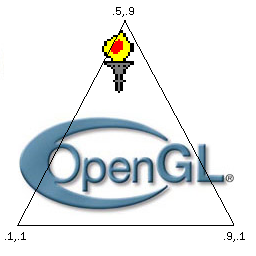
These next two examples build a textured cube and a textured cylinder with the normals applied. The cylinder example shows how to apply a texture to a Quad-strip.
'cube with bitmap texture
CALL ClearView eyeX , eyeY , eyeZ , centerX , centerY , centerZ , upX , upY , upZ
CALL glClearColor .8 , .8 , .8 , 1
Texture = 1
CALL CreateBMPTexture "OpenGL_Logo.bmp" , Texture ' load bitmap and put in Texture #1
Width = 1.5
Height = 1.5
Depth = 1.5
CubeCenterX = 0
CubeCenterY = 0
CubeCenterZ = 0
CALL glGenLists 1
CALL glNewList 1 , 4865
CALL BuildTextureCube Width , Height , Depth , CubeCenterX , CubeCenterY , CubeCenterZ , Texture
CALL glEndList
FOR a = 1 TO 360
CALL ClearView eyeX , eyeY , eyeZ , centerX , centerY , centerZ , upX , upY , upZ
CALL glRotatef a , 1 , 0 , 0
'CALL glRotatef a , 0 , 1 , 0
CALL glRotatef a , 0 , 0 , 1
CALL glCallList 1
CALL RefreshView
CALL Pause 15
NEXT a
WAIT
SUB BuildTextureCube W , H , D , cX , cY , cZ , tex
GL.QUADS=7
GL.TEXTURE.2D = 3553
CALL glEnable GL.TEXTURE.2D
CALL glBindTexture GL.TEXTURE.2D , tex
tc=1 ' change to a value greater than 1 to have the texture tiled
'front
CALL glBegin GL.QUADS
CALL glNormalcX-(W/2) , cY-(H/2) , cZ+(D/2) , cX-(W/2) , cY+(H/2) , cZ+(D/2) , cX+(W/2) , cY+(H/2) , cZ+(D/2)cX-(W/2),cY-(H/2),cZ+(D/2) , cX-(W/2),cY+(H/2),cZ+(D/2) , cX+(W/2),cY+(H/2),cZ+(D/2)
CALL TextureVertex 0 , tc , cX-(W/2) , cY+(H/2) , cZ+(D/2)
CALL TextureVertex tc , tc , cX+(W/2) , cY+(H/2) , cZ+(D/2)
CALL TextureVertex tc , 0 , cX+(W/2) , cY-(H/2) , cZ+(D/2)
CALL TextureVertex 0 , 0 , cX-(W/2) , cY-(H/2) , cZ+(D/2)
CALL glEnd
'back
CALL glBegin GL.QUADS
CALL glNormalcX+(W/2) , cY+(H/2) , cZ-(D/2) , cX-(W/2) , cY+(H/2) , cZ-(D/2) , cX-(W/2) , cY-(H/2) , cZ-(D/2)cX+(W/2),cY+(H/2),cZ-(D/2) , cX-(W/2),cY+(H/2),cZ-(D/2) , cX-(W/2),cY-(H/2),cZ-(D/2)
CALL TextureVertex 0 , tc , cX+(W/2) , cY+(H/2) , cZ-(D/2)
CALL TextureVertex tc , tc , cX-(W/2) , cY+(H/2) , cZ-(D/2)
CALL TextureVertex tc , 0 , cX-(W/2) , cY-(H/2) , cZ-(D/2)
CALL TextureVertex 0 , 0 , cX+(W/2) , cY-(H/2) , cZ-(D/2)
CALL glEnd
'left
CALL glBegin GL.QUADS
CALL glNormalcX-(W/2) , cY+(H/2) , cZ-(D/2) , cX-(W/2) , cY+(H/2) , cZ+(D/2) , cX-(W/2) , cY-(H/2) , cZ+(D/2)cX-(W/2),cY+(H/2),cZ-(D/2) , cX-(W/2),cY+(H/2),cZ+(D/2) , cX-(W/2),cY-(H/2),cZ+(D/2)
CALL TextureVertex 0 , tc , cX-(W/2) , cY+(H/2) , cZ-(D/2)
CALL TextureVertex tc , tc , cX-(W/2) , cY+(H/2) , cZ+(D/2)
CALL TextureVertex tc , 0 , cX-(W/2) , cY-(H/2) , cZ+(D/2)
CALL TextureVertex 0 , 0 , cX-(W/2) , cY-(H/2) , cZ-(D/2)
CALL glEnd
'right
CALL glBegin GL.QUADS
CALL glNormalcX+(W/2) , cY+(H/2) , cZ+(D/2) , cX+(W/2) , cY+(H/2) , cZ-(D/2) , cX+(W/2) , cY-(H/2) , cZ-(D/2)cX+(W/2),cY+(H/2),cZ+(D/2) , cX+(W/2),cY+(H/2),cZ-(D/2) , cX+(W/2),cY-(H/2),cZ-(D/2)
CALL TextureVertex 0 , tc , cX+(W/2) , cY+(H/2) , cZ+(D/2)
CALL TextureVertex tc , tc , cX+(W/2) , cY+(H/2) , cZ-(D/2)
CALL TextureVertex tc , 0 , cX+(W/2) , cY-(H/2) , cZ-(D/2)
CALL TextureVertex 0 , 0 , cX+(W/2) , cY-(H/2) , cZ+(D/2)
CALL glEnd
'top
CALL glBegin GL.QUADS
CALL glNormalcX-(W/2) , cY+(H/2) , cZ+(D/2) , cX-(W/2) , cY+(H/2) , cZ-(D/2) , cX+(W/2) , cY+(H/2) , cZ-(D/2)cX-(W/2),cY+(H/2),cZ+(D/2) , cX-(W/2),cY+(H/2),cZ-(D/2) , cX+(W/2),cY+(H/2),cZ-(D/2)
CALL TextureVertex 0 , tc , cX-(W/2) , cY+(H/2) , cZ+(D/2)
CALL TextureVertex tc , tc , cX-(W/2) , cY+(H/2) , cZ-(D/2)
CALL TextureVertex tc , 0 , cX+(W/2) , cY+(H/2) , cZ-(D/2)
CALL TextureVertex 0 , 0 , cX+(W/2) , cY+(H/2) , cZ+(D/2)
CALL glEnd
'bottom
CALL glBegin GL.QUADS
CALL glNormalcX-(W/2) , cY-(H/2) , cZ+(D/2) , cX+(W/2) , cY-(H/2) , cZ+(D/2) , cX+(W/2) , cY-(H/2) , cZ-(D/2)cX-(W/2),cY-(H/2),cZ+(D/2) , cX+(W/2),cY-(H/2),cZ+(D/2) , cX+(W/2),cY-(H/2),cZ-(D/2)
CALL TextureVertex 0 , tc , cX-(W/2) , cY-(H/2) , cZ+(D/2)
CALL TextureVertex tc , tc , cX+(W/2) , cY-(H/2) , cZ+(D/2)
CALL TextureVertex tc , 0 , cX+(W/2) , cY-(H/2) , cZ-(D/2)
CALL TextureVertex 0 , 0 , cX-(W/2) , cY-(H/2) , cZ-(D/2)
CALL glEnd
CALL glDisable GL.TEXTURE.2D
END SUB
 ' build a textured cylinder
 CALL ClearView eyeX , eyeY , eyeZ , centerX , centerY , centerZ , upX , upY , upZ
 CALL glClearColor .8 , .8 , .8 , 1
 Texture = 1
 CALL CreateBMPTexture "OpenGL_Logo.bmp" , Texture ' load texture and put it in texture #1

 Angle = 110
 Width = .5
 Depth = .5
 Height = 2
 cX = 0
 cY = 0
 cZ = 0
 Red = .5
 Green = 0
 Blue = 0
 Sides = 200

 CALL glGenLists 1
 CALL glNewList 1 , 4865
 CALL BuildTextureCylinder Angle , Width , Depth , Height , cX , cY , cZ , Texture , Sides
 CALL glEndList

 FOR a = 1 TO 360
 CALL ClearView eyeX , eyeY , eyeZ , centerX , centerY , centerZ , upX , upY , upZ
 CALL glRotatef a , 1 , 0 , 0
 CALL glRotatef a , 0 , 1 , 0
 'CALL glRotatef a , 0 , 0 , 1
 CALL glCallList 1

 CALL RefreshView
 CALL Pause 15
 NEXT a


 WAIT


 SUB BuildTextureCylinder Angle , W , D , H , cX , cY , cZ , tex , Sides
 GL.QUAD.STRIP = 8
 GL.TEXTURE.2D = 3553
 CALL glEnable GL.TEXTURE.2D
 CALL glBindTexture GL.TEXTURE.2D , tex
 PI = 3.14159265

 sin.angle = Sin(Angle * PI / 180)
 cos.angle = Cos(Angle * PI / 180)

 theta = 0
 dtheta = 2 * PI / Sides

 TexCoordinate=1

 XOval = W * Cos(theta)
 YOval = D * Sin(theta)
 X1 = cX + XOval * cos.angle - YOval * sin.angle
 Z1 = cZ - XOval * sin.angle - YOval * cos.angle

 ' X2 , Z2 values for the first glNormal call
 XOval = W * Cos(dtheta)
 YOval = D * Sin(dtheta)
 X2 = cX + XOval * cos.angle - YOval * sin.angle
 Z2 = cZ - XOval * sin.angle - YOval * cos.angle

 CALL glBegin GL.QUAD.STRIP

 WHILE theta < 2 * PI

 CALL glNormal X1 , cY+(H/2) , Z1 , X2 , cY+(H/2) , Z2 , X1 , cY-(H/2) , Z1
 CALL TextureVertex TexCoordinate , 1 , X1 , cY+(H/2) , Z1
 CALL TextureVertex TexCoordinate , 0 , X1 , cY-(H/2) , Z1

 theta = theta + dtheta
 XOval = W * Cos(theta)
 YOval = D * Sin(theta)
 X2 = X1
 Z2 = Z1
 X1 = cX + XOval * cos.angle + YOval * sin.angle
 Z1 = cZ - XOval * sin.angle + YOval * cos.angle

 TexCoordinate = TexCoordinate - (1/Sides)

 WEND

 CALL glNormal X1 , cY+(H/2) , Z1 , X2 , cY+(H/2) , Z2 , X1 , cY-(H/2) , Z1
 CALL TextureVertex TexC , 1 , X1 , cY+(H/2) , Z1
 CALL TextureVertex TexC , 0 , X1 , cY-(H/2) , Z1

 CALL glEnd
 END SUB
Next we will be creating "Transparent surfaces and fog"