Older Version
Newer Version
 Alyce
Jul 9, 2011
Alyce
Jul 9, 2011
QCard DLL Lesson 5
Lesson 4 Lesson 6-
 Alyce
Alyce QCard DLL Lesson 5 | Getting Card Info | Suit? | Value? | Color? | Status? | DEMO
See Lesson 1 for QCard DLL and WAV files needed for the demo code.
Getting Card Info
In earlier lessons, we discussed dealing the cards, showing their fronts or their backs, and changing the card back design. To create a playable game, we must ascertain the suit and value of a card selected by the user. In Lesson 4, we discovered the card that was clicked by the user and found its index in our card array. With that index, we can find out more about the card.
Suit?
Remember, we have filled an array called card() with a set of shuffled cards. When we know which card from the array was selected by the user, we check the value of that card and place it into a variable called clickCard . See Lesson 4 to refresh your memory on this.
There is a function in the Qcard DLL to get the suit of a card, called GetCardSuit() It requires the index number of the card, and returns the suit as a number. A return of 1 means the card is a club, 2 means it is a diamond, 3 means it is a heart and 4 means that it is a spade.
 calldll #qc, "GetCardSuit",_
 nIndex as long,_ 'index of card to query
 suit as long 'returns 1=Clubs, 2=Diamonds, 3=Hearts, 4=Spades.
Here is the API call, wrapped in a Liberty BASIC function:
 Function GetCardSuit(nC)
 'returns 1=Clubs, 2=Diamonds, 3=Hearts, 4=Spades.
 calldll #qc, "GetCardSuit",nC as long,_
 GetCardSuit as long
 End Function
Value?
In a very similar way, we can get the value of the card. The function from the DLL is GetCardValue . The first argument is the index of the card to query. The function returns the value of the card, where an ace is 1, a deuce is 2, and so on, up to 11 for jack, 12 for queen, and 13 for king.
 calldll #qc, "GetCardValue",_
 nIndex as long,_ 'index of card to query
 value as long 'ace=1,deuce=2....jack=11,queen=12,king=13
Here is the API call, wrapped in a Liberty BASIC function:
 Function GetCardValue(nC)
 'ace=1,deuce=2....jack=11,queen=12,king=13
 calldll #qc, "GetCardValue",nC as long,_
 GetCardValue as long
 End Function
Color?
We don't need to know the color of a card in our demo, but there is a function for this in the Qcard DLL. The first argument is the index of the card, and it returns the color. A return of 1 means the card is black, while 2 means that it is red.
 calldll #qc, "GetCardColor",_
 nIndex as long,_ 'index of card to query
 color as long '1=black, 2=red
Status?
In our demo we've used the function SetCardStatus to cause either the back or the front of a card to be displayed. There is also a function to GetCardStatus in the DLL. The first argument is the index of the card to query, and the return is the card's status. A status of 1 means that the card is face up, while 0 means that it is face down.
 calldll #qc, "GetCardStatus",_
 nIndex as long,_ 'index of card to query
 status as long '1=face up, 0=face down
DEMO
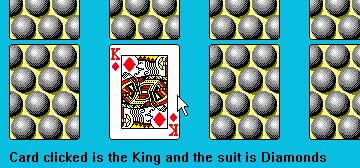
See Lesson 1 for QCard DLL and WAV files needed for the demo code.The demo program that accompanies this lesson allows the user to click on one of the cards, and the program ascertains the suit and value of the card. It then gives the user a message stating which suit and value were chosen.
'coming soon
QCard DLL Lesson 5 | Getting Card Info | Suit? | Value? | Color? | Status? | DEMO
Lesson 4 Lesson 6