Older Version
Newer Version
 Alyce
Aug 18, 2011
Alyce
Aug 18, 2011
QCard DLL Lesson 13
Lesson 12-
 Alyce
Alyce QCard DLL Lesson 13 | Dealing a Hand | Card Selected? | Removing and Redealing the Hand | DEMO
See Lesson 1 for QCard DLL and WAV files needed for the demo code.
Dealing a Hand
A hand of cards is generally displayed with the cards overlapped horizontally. For demonstration purposes, we'll create a card array and fill it with various cards. The logic of a card game dictates how cards are dealt and keeps track of which cards have been dealt, the hand that contains them, etc.We're adding a horizontal offset variable to the code to make this "overlap amount" easy to change. We'll use a value of 50.
We'll create a double dimensioned array for our demo hand of cards. The first dimension is the QCard index of the card.
 xOffset=50 'horizontal offset for dealing hand
 dim card(8,2) 'array to hold cards
 'fill array with demo hand of cards
 'in a game, the logic would dictate how hands are created
 'first dimension is card index
 card(1,1)=3
 card(2,1)=18
 card(3,1)=33
 card(4,1)=51
 card(5,1)=44
 card(6,1)=12
 card(7,1)=39
 card(8,1)=22
We'll deal the cards in a loop, incrementing the x location each time. As we deal each card in our "hand" array, we'll save the x location in the second dimension of the array.
 'set xy location to start deal
 x=10:y=200
 for i = 1 to 8
 Call DealCard hBox,card(i,1),x,y
 'save the x location of each card
 card(i,2)=x
 x=x+xOffset
 scan
 next
Card Selected?
There are two ways to retrieve the index of the card selected by the user. The first way was demonstrated in Lesson 4 . Card x,y location is documented in the card array and MouseX and MouseY are compared to the known coordinates of cards to find a match.The other way to retrieve the index of the selected card is to use the InitDrag function as we did in Lesson 9 . The function returns the index of the card at given coordinates, so we use MouseX and MouseY.
Because the DLL is set up to select the lowest card at a given x,y location, we need to check the x location and see if the mouse click was beyond the x offset for overlap.
 cardIndex=InitDrag(hBox,MouseX,MouseY)
 if cardIndex=0 then wait

 'retrieve the index of card in array that matches index returned by DLL
 for i = 1 to 8
 if cardIndex=card(i,1) then arrayIndex=i
 next
If it is beyond that x location, we change the card index to that of the next card in the array. InitDrag returns the index of the card under the mouse, so we can use that value to get the X and Y location of the card.
if MouseX > card(arrayIndex,2)+xOffset then
If the MouseX location is greater than the card's x location plus the xOffset value, that means the user actually clicked on the card above the card returned by the DLL. Remember, the DLL always looks for the lowest card at given coordinate. We then change the value of cardIndex to be that of the next card in the hand, which is the next card in our array.
 'Check to see if user clicked the card at an x value
 'greater than the xOffset. If this is true, change
 'cardIndex to be the index of the next card in the card array.
 if MouseX > card(arrayIndex,2)+xOffset then
 cardIndex=card(arrayIndex+1,1)
 end if
Removing and Redealing the Hand
Once we have the index of the card clicked, we need to remove all cards in the hand from the display. The QCard DLL keeps a snapshot of the display beneath each card. We need to remove cards before redealing them so that the DLL has the proper snapshot to use when it restores the original display when removing a card.
We also need to call AbortDrag to cause the DLL to stop capturing mouse events.
 call AbortDrag
 for i = 1 to 8
 call RemoveCard hBox, card(i,1)
 next
We deal the cards again. When we deal the card that was selected by the user, we place it a bit higher in the row than the rest of the hand.
 x=10:y=200
 for i = 1 to 8
 if cardIndex=card(i,1) then y=140 else y=200
 Call DealCard hBox,card(i,1),x,y
 x=x+xOffset
 scan
 next
The program below demonstrates these methods.
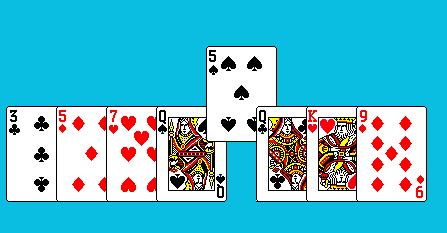
DEMO
See Lesson 1 for QCard DLL and WAV files needed for the demo code.'An open project card game, begun by Alyce Watson, May 27, 2003.
'Uses Qcard32.dll, a freeware library of playing card images.
'DLL by Stephen Murphy. Qcard32.DLL website:
'http://www.telusplanet.net/public/stevem/
xOffset=50 'horizontal offset for dealing hand
dim card(8,2) 'array to hold cards
'fill array with demo hand of cards
'in a game, the logic would dictate how hands are created
'first dimension is card index
card(1,1)=3
card(2,1)=18
card(3,1)=33
card(4,1)=51
card(5,1)=44
card(6,1)=12
card(7,1)=39
card(8,1)=22
nomainwin
WindowWidth=640:WindowHeight=480
UpperLeftX=1:UpperLeftY=1
menu #1, "&File", "E&xit", [quit]
graphicbox #1.g, 0, 0, 640, 440
open "Cards" for window_nf as #1
#1 "trapclose [quit]"
'get graphicbox handle
hBox=hwnd(#1.g)
'open the dll
open "qcard32.dll" for dll as #qc
'initialize the deck
Call InitializeDeck hBox
[new]
Call SetDefaultValues
'draw a nice background
#1.g "down; fill 10 190 225"
#1.g "backcolor 10 190 225"
'temp message for this demo only
#1.g "place 10 40;\Left-click a card to select it."
'set xy location to start deal
x=10:y=200
for i = 1 to 8
Call DealCard hBox,card(i,1),x,y
'save the x location of each card
card(i,2)=x
x=x+xOffset
scan
next
#1.g "when leftButtonDown [initDrag]"
#1.g "when leftButtonUp [redraw]"
wait
[initDrag]
cardIndex=InitDrag(hBox,MouseX,MouseY)
if cardIndex=0 then wait
'retrieve the index of card in array that matches index returned by DLL
for i = 1 to 8
if cardIndex=card(i,1) then arrayIndex=i
next
'Check to see if user clicked the card at an x value
'greater than the xOffset. If this is true, change
'cardIndex to be the index of the next card in the card array.
if MouseX > card(arrayIndex,2)+xOffset then
cardIndex=card(arrayIndex+1,1)
end if
#1.g "place 10 420;\Selected Card Index is ";cardIndex;space$(100)
wait
[redraw]
if cardIndex=0 then wait
call AbortDrag
for i = 1 to 8
call RemoveCard hBox, card(i,1)
next
x=10:y=200
for i = 1 to 8
if cardIndex=card(i,1) then y=140 else y=200
Call DealCard hBox,card(i,1),x,y
x=x+xOffset
scan
next
wait
[quit] close #qc:close #1:end
''''''''''''''''''''
'subs and functions:
Function InitDrag(hndle, x, y)
calldll #qc, "InitDrag",_
hndle as ulong, x as long, y as long,_
InitDrag as long
end function
Sub AbortDrag
calldll #qc, "AbortDrag",re as void
end sub
Sub InitializeDeck hndle
calldll #qc, "InitializeDeck",_
hndle as ulong,r as long
End Sub
Sub DealCard hndle,nC,x,y
'places card on window whose handle is hndle at x,y
'nC is number of card - 1-52 in first deck and
'53-104 in second deck, if used
calldll #qc, "DealCard",hndle as ulong,nC as long,_
x as long,y as long,r as void
End Sub
Sub RemoveCard hndle,nC
'removes a card from screen that was
'drawn with DealCard, replacing screen background
calldll #qc, "RemoveCard",hndle as ulong,_
nC as long,r as void
End Sub
Sub SetDefaultValues
'reset all card properties back to their default values.
calldll #qc, "SetDefaultValues",r as void
End Sub
QCard DLL Lesson 13 | Dealing a Hand | Card Selected? | Removing and Redealing the Hand | DEMO
Lesson 12