Older Version
Newer Version
 JanetTerra
Feb 5, 2007
JanetTerra
Feb 5, 2007
Creating Columns in a Textbox with _EM_SETTABSTOPS
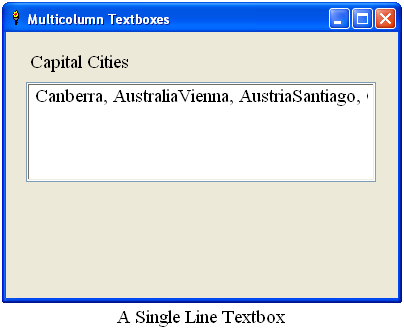
The typical Liberty BASIC textbox display is a single line of text. With a few simple changes, the textbox #main.col, can and will display the output in column format. Copy or type this small program into your Liberty BASIC IDE. All changes will be made within the
' =========================================================block of code.
' Modified Code
' =========================================================
 Nomainwin

 ' Design a GUI with a textbox
 WindowWidth = 400
 WindowHeight = 300

 UpperLeftX = Int((DisplayWidth - WindowWidth) /2)
 UpperLeftY = Int((DisplayHeight - WindowHeight) /2)

 Statictext #main, "Capital Cities", 24, 20, 350, 24
 Textbox #main.col, 20, 50, 350, 100
 Open "Multicolumn Textboxes" for Window as #main
 #main, "Trapclose XbyTrap"

 ' =========================================================
 ' Make changes to code here

 #main, "Font Times_New_Roman 14"

 ' Create data appropriate for column output
 Dim capital$(20)
 capital$ = ""
 For i = 1 to 20
 Read c$
 capital$(i) = c$
 capital$ = capital$;capital$(i);Chr$(13);Chr$(10)
 Next i

 #main.col, capital$

 ' =========================================================

 Wait

 Sub XbyTrap handle$
 Close #handle$
 End
 End Sub

 Data "Canberra, Australia"
 Data "Vienna, Austria"
 Data "Santiago, Chile"
 Data "Copenhagen, Denmark"
 Data "Cairo, Egypt"
 Data "London, England"
 Data "Helsinki, Finland"
 Data "Paris, France"
 Data "Athens, Greece"
 Data "Rome, Italy"
 Data "Tokyo, Japan"
 Data "Amsterdam, Netherlands"
 Data "Abuja, Nigeria"
 Data "Oslo, Norway"
 Data "Lisbon, Portugal"
 Data "Mogadishu, Somalia"
 Data "Madrid, Spain"
 Data "Bern, Switzerland"
 Data "Damascus, Syria"
 Data "Ankara, Turkey"
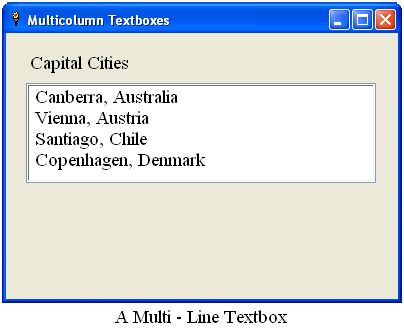
Multilines with Carriage Return and Line Feed
The text output of any Liberty BASIC textbox can be forced to the next line using a carriage return, Chr$(13) , and a line feed Chr$(10) .
 ' =========================================================
 ' Make changes to code here

 #main, "Font Times_New_Roman 14"

 ' Create data appropriate for column output
 Dim capital$(20)
 capital$ = ""
 For i = 1 to 20
 Read c$
 capital$(i) = c$
 capital$ = capital$;capital$(i);Chr$(13);Chr$(10)
 Next i

 #main.col, capital$

 ' =========================================================
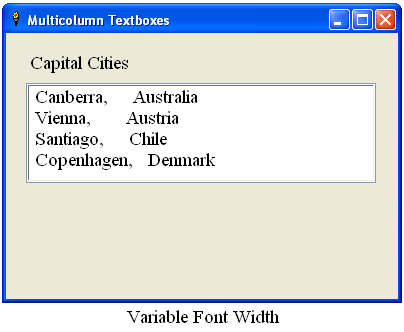
Simulating Tabs with Spaces
It is possible to simulate tabs using spaces.
- Determine the number of spaces to place the second column
- Determine the number of characters in the text of the first column
- Subtract that number of characters from the desired second column position
 ' =========================================================
 ' Make changes to code here

 #main, "Font Times_New_Roman 14"
 ' Create data appropriate for column output
 Dim capital$(20)
 capital$ = ""
 For i = 1 to 20
 Read c$
 city$ = Word$(c$, 1)
 nation$ = Word$(c$, 2)
 capital$(i) = city$;Space$(14 - Len(city$));nation$
 capital$ = capital$;capital$(i);Chr$(13);Chr$(10)
 Next i

 #main.col, capital$

 ' =========================================================
Variable Font Width vs Fixed Font Width
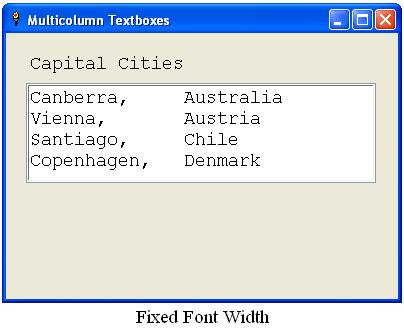
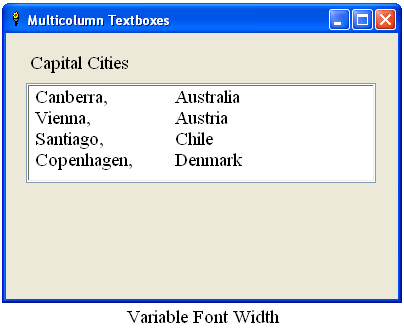
Hey, this doesn't look right. What happened? The problem with using Space$(20 - Len(city$)) lies with the choice of font. This math formula is not dependable with fonts of variable font width, such as Times New Roman . The math formula is dependable with fonts of fixed font width, such as Courier New . Changing the font to a fixed font width will give a more desirable output.
 ' =========================================================
 ' Make changes to code here

 #main, "Font Courier_New 14"
 ' Create data appropriate for column output
 Dim capital$(20)
 capital$ = ""
 For i = 1 to 20
 Read c$
 city$ = Word$(c$, 1)
 nation$ = Word$(c$, 2)
 capital$(i) = city$;Space$(14 - Len(city$));nation$
 capital$ = capital$;capital$(i);Chr$(13);Chr$(10)
 Next i

 #main.col, capital$

 ' =========================================================
Setting a TabStop with _EM_SETTABSTOPS
A tabstop can be defined in your Liberty BASIC programs by sending the _EM_SETTABSTOPS message to the textbox. Setting a tabstop allows column formatting with fonts of variable fonts such as Times New Roman. Tabstops are defined as a set, the set being passed as an array. Liberty BASIC passes an array as a struct. In this simple example, only one tabstop is being set. Still that one tabstop must be passed as a struct.
 ' =========================================================
 ' Make changes to code here

 #main, "Font Times_New_Roman 14"

 ' Get the handle of the textbox
 hTB = hWnd(#main.col)

 ' Define the struct
 Struct TabStop, tab1 as Long

 ' Set the struct variable
 TabStop.tab1.struct = 56

 ' Define the tab key [ Tab = Chr$(9) ]
 LBTab$ = Chr$(9)

 ' Send the message
 CallDLL #user32, "SendMessageA", _
 hTB as Ulong, _ ' Handle of textbox
 _EM_SETTABSTOPS as Long, _ ' Windows Constant 203
 1 as Long, _ ' The number of tabstops to set
 TabStop as Struct, _ ' The array of tabstops
 SetTabs as Long ' Non-zero equals success

 ' Create data appropriate for column output
 Dim capital$(20)
 capital$ = ""
 For i = 1 to 20
 Read c$
 city$ = Word$(c$, 1)
 nation$ = Word$(c$, 2)
 capital$(i) = city$;LBTab$;nation$
 capital$ = capital$;capital$(i);Chr$(13);Chr$(10)
 Next i

 #main.col, capital$

 ' =========================================================
Dialog Units
Notice that TabStop.tab1.struct is set to 56. This doesn't set the tabstop position to 56 characters to the right, but 56 dialog units to the right. A dialog unit is approximately 1/4 the width of a character in the assigned font. In the fixed width ( Courier New ) example, the tabstop was simulated at 14 characters to the right. Multiplying that number of characters by 4 ( 14 x 4 `=` 56 ), yields the tabstop position of 56 dialog units .
Adding a Scrollbar and Editing the Textbox
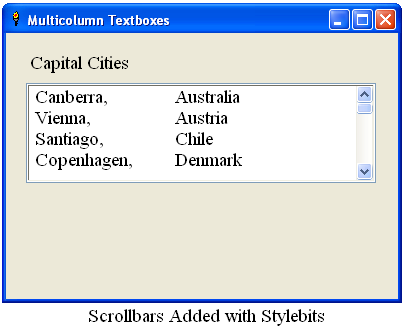
Add a scrollbar to the textbox with Stylebits . Stylebits must be added before the window is opened.
Textbox #main.col, 20, 50, 350, 100Text within the textbox can be edited. To force a new line, press Ctrl-Enter. To advance to the next tabstop, press Ctrl-Tab. Try editing one of the capital cities in the text box or add a new capital city to the list.
Stylebits #main.col, _WS_VSCROLL OR _ES_MULTILINE, _ES_AUTOHSCROLL, 0, 0
Multiple Tabstops
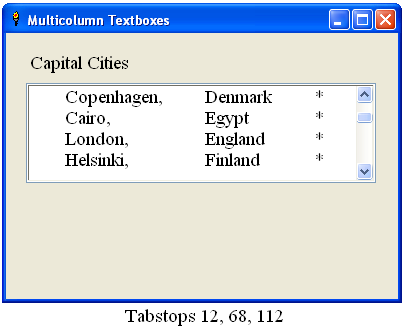
It is possible to set a number of tabstops in the textbox. Each tabstop must be passed as part of the struct. The following demo sets up three tabstops, each of varying distances.
Nomainwin
' Design a GUI with a textbox
WindowWidth = 400
WindowHeight = 300
UpperLeftX = Int((DisplayWidth - WindowWidth) /2)
UpperLeftY = Int((DisplayHeight - WindowHeight) /2)
Statictext #main, "Capital Cities", 24, 20, 350, 24
 Textbox #main.col, 20, 50, 350, 100
 Stylebits #main.col, _WS_VSCROLL OR _ES_MULTILINE, _ES_AUTOHSCROLL, 0, 0
Open "Multicolumn Textboxes" for Window as #main
#main, "Trapclose XbyTrap"
#main, "Font Times_New_Roman 14"
' Get the handle of the textbox
hTB = hWnd(#main.col)
' Define the struct to hold 3 tabstops
Struct TabStop, tab1 as Long, tab2 as Long, tab3 as Long
' Define the tab key [ Tab = Chr$(9) ]
LBTab$ = Chr$(9)
' Make the API Call
Call SetTabStops hWnd(#main.col), 12, 68, 112
' Create data appropriate for column output
capital$ = ""
For i = 1 to 20
Read c$
city$ = Word$(c$, 1)
nation$ = Word$(c$, 2)
txt$ = LBTab$;city$;LBTab$;nation$;LBTab$;"*"
capital$ = capital$;txt$;Chr$(13);Chr$(10)
Next i
#main.col, capital$
Wait
Sub XbyTrap handle$
Close #handle$
End
End Sub
Sub SetTabStops hTb, tb1, tb2, tb3
TabStop.tab1.struct = tb1
TabStop.tab2.struct = tb2
TabStop.tab3.struct = tb3
CallDLL #user32, "SendMessageA", _
hTb as Ulong, _ ' Handle of textbox
_EM_SETTABSTOPS as Long, _ ' Windows Constant 203
3 as Long, _ ' The number of tabstops to set
TabStop as Struct, _ ' The array of tabstops
SetTabs as Long ' Non-zero equals success
End Sub
Data "Canberra, Australia"
Data "Vienna, Austria"
Data "Santiago, Chile"
Data "Copenhagen, Denmark"
Data "Cairo, Egypt"
Data "London, England"
Data "Helsinki, Finland"
Data "Paris, France"
Data "Athens, Greece"
Data "Rome, Italy"
Data "Tokyo, Japan"
Data "Amsterdam, Netherlands"
Data "Abuja, Nigeria"
Data "Oslo, Norway"
Data "Lisbon, Portugal"
Data "Mogadishu, Somalia"
Data "Madrid, Spain"
Data "Bern, Switzerland"
Data "Damascus, Syria"
Data "Ankara, Turkey"
A special thanks to Bill Beasley who posted code using _EM_SETTABSTOPS for the Liberty BASIC community.