Older Version
Newer Version
 Alyce
Jul 18, 2011
Alyce
Jul 18, 2011
Using Cards DLL
- Alyce Jul 7, 2011
 Using Cards DLL | What is Cards.DLL? | How is it used? | Custom Dimensions | cdtDrawExt | Creating a Card Game | SimpleDemo | Demo Two
What is Cards.DLL?
Cards.DLL and Cards32.DLL are DLLs that contain playing card images. They are part of the Windows operating system. Some versions of Windows have one of the DLLs, some have the other DLL, and some have none.Because the DLL is not available or does not have the same name in all versions of Windows, it is necessary to make one or two API calls to LoadLibraryA to ascertain if one of the DLLs is present.
 hDLL=LoadLibrary("cards32.dll")
 if hDLL<>0 then
 dll$="cards32.dll"
 end if

 if hDLL=0 then
 hDLL=LoadLibrary("cards.dll")
 if hDLL<>0 then
 dll$="cards.dll"
 end if
 end if

 if hDLL=0 then
 notice "No DLL available."
 end
 end if

 wait
 Function LoadLibrary(file$)
 Calldll #kernel32, "LoadLibraryA", file$ As Ptr, LoadLibrary As Ulong
 End Function

 Function FreeLibrary(hDLL)
 Calldll #kernel32, "FreeLibrary", hDLL As Ulong, FreeLibrary As Long
 End Function
If you do not have a copy, you may download the Cards.DLL here.

How is it used?
The Cards.DLL must be opened, since Liberty BASIC doesn't recognize it as a standard Windows DLL. It must then be initialized before use with cdtInit . It must be terminated with cdtTerm .'initialize at start:
'create structs that allow function to return default card sizes
struct cardX, cardwidth as long
struct cardY, cardheight as long
calldll #card,"cdtInit",_ 'initialize DLL
cardX as struct,_ 'will contain card width
cardY as struct,_ 'will contain card height
result as long
'at end of program:
calldll #card,"cdtTerm",result as void
Cards are drawn with cdtDraw .
calldll #card,"cdtDraw",_
hDC as ulong,_ 'graphics device context
x as long,_ 'desired x location
y as long,_ 'desired y location
iCard as long,_ '0-51=deck, 52=68=specials
iDraw as long,_ '0=front, 1=back, 2=invert for active
clr as long,_ 'background color
result as long
The initialization functions fills two structs. One returns the width of the card images and the other returns the height. Use these values in calculations for card placement.
'Open the card DLL
open dll$ for dll as #card
'create structs that allow function to return default card sizes
struct cardX, cardwidth as long
struct cardY, cardheight as long
calldll #card,"cdtInit",_ 'initialize DLL
cardX as struct,_ 'will contain card width
cardY as struct,_ 'will contain card height
result as long
cardWide = cardX.cardwidth.struct
cardHigh = cardY.cardheight.struct
The DLL contains card face images for all four suits, ace to king. It also contains multiple card back images. The programmer chooses which face or back to draw. The DLL also has images for the X card and the O card that you sometimes see in card games as place holders. The indices of the playing cards are 0-51 and are documented in the accompanying demo. Indices 52-68 are for the card backs and special designs and are also shown in the demo.
'Indices of cards in deck, numbered 0-51:
clubs = 0 'ace of clubs=0,deuce=4,three=8...king=48
diamonds = 1 'ace of diamonds=1,deuce=5,three=9...king=49
hearts = 2 'ace of hearts=2,deuce=6,three=10...king=50
spades = 3 'ace of spades=3,deuce=7,three=11...king=51
ace=0 'values increment by 4, which is the number of suits
deuce=4
three=8
four=12
five=16
six=20
seven=24
eight=28
nine=32
ten=36
jack=40
queen=44
king=48
'formula for card index: cardValue+cardSuit
'queen of hearts is
queenHearts = queen+hearts
The function to draw a card requires the device context of the graphics area, which is obtained with GetDC.
CallDLL #user32, "GetDC",_
hWnd As Ulong,_ 'window or control handle
GetDC As Ulong 'returns device context
It then requires the X and Y location to draw the card. It needs to know the index of the card to be drawn. The next argument is the mode. If you are drawing a card face, the mode value is 0. If you are drawing a back or a special design, the value is 1. If you want the card to be displayed with inverted colors, the mode value is 2.
calldll #card,"cdtDraw",_
hDC as ulong,_ 'graphics device context
x as long,_ 'desired x location
y as long,_ 'desired y location
iCard as long,_ '0-51=deck, 52=68=specials
iDraw as long,_ '0=front, 1=back, 2=invert for active
clr as long,_ 'background color
result as long
The function also requires the color of the display as a long value. The demo shows you how to create a long color value from red, green and blue values.
function MakeRGB(red,green,blue)
if red<0 then red=0
if red>255 then red=255
if green<0 then green=0
if green>255 then green=255
if blue<0 then blue=0
if blue>255 then blue=255
MakeRGB=(blue*256*256)+(green*256)+red
end function
Custom Dimensions
The DLL offers a second, extended drawing function, cdtDrawExt. It uses all of the same arguments as the cdtDraw function and adds arguments for the desired card width and card height. This allows the programmer to ignore the values obtained in the cdtInit function and set the card width and card height as desired.
We must use the cdtInit function at the start and the cdtTerm function when the program closes, just as we do with the cdtDraw function.
 'initialize at start:
 'create structs that allow function to return default card sizes
 struct cardX, cardwidth as long
 struct cardY, cardheight as long

 calldll #card,"cdtInit",_ 'initialize DLL
 cardX as struct,_ 'will contain card width
 cardY as struct,_ 'will contain card height
 result as long

 'at end of program:
 calldll #card,"cdtTerm",result as void
When using cdtDrawExt we can ignore the values returned in the two structs and assign our own width and height to the cards.
cardWide = 150 'our custom card width
cardHigh = 280 'our custom card height
cdtDrawExt
The cdtDrawExt function requires two more parameters than the cdtDraw function. It looks like this:
calldll #card,"cdtDrawExt",_
hDC as ulong,_ 'graphics device context
x as long,_ 'desired x location
y as long,_ 'desired y location
wide as long,_ 'desired width of card
high as long,_ 'desired height of card
iCard as long,_ '0-51=deck, 52=68=specials
iDraw as long,_ '0=front, 1=back, 2=invert for active
clr as long,_ 'background color
result as long
See the demo of cdtDrawExt at the bottom of this article.
Creating a Card Game
The DLL allows you to display playing card images easily. The game logic must be created by the programmer.Two demo programs are offered below. The first one uses the default card dimensions. The second one uses the extended drawing function to create custom card dimensions.
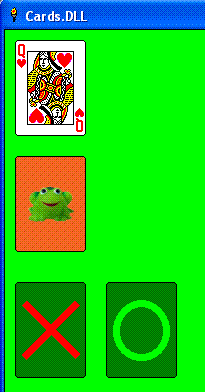
Simple Demo looks like this:
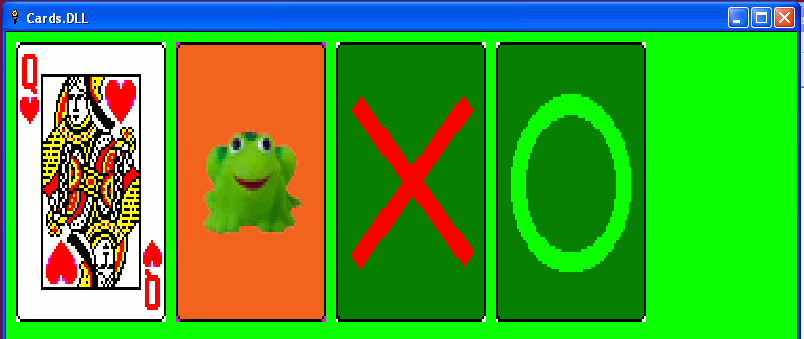
Demo Two looks like this:
SimpleDemo
The following demo draws'Windows Cards.DLL demo by Alyce Watson
'based on code by UncleBen, Rod Bird, Stefan Pendl and others.
'Cards.DLL or Cards32.DLL are part of the Windows OS.
'These DLLs are not included in Windows 7.
'This demo checks for the existence of the DLLs
'with LoadLibraryA API.
'this demo uses three functions
' cdtInit to intiialize
' cdtDraw to draw card
' cdtTerm to terminate use of DLL
'SIMPLE DEMO TO SHOW CARD FACE UP, FACE DOWN, X DESIGN AND 0 DESIGN
nomainwin
'Indices of cards in deck, numbered 0-51:
clubs = 0 'ace of clubs=0,deuce=4,three=8...king=48
diamonds = 1 'ace of diamonds=1,deuce=5,three=9...king=49
hearts = 2 'ace of hearts=2,deuce=6,three=10...king=50
spades = 3 'ace of spades=3,deuce=7,three=11...king=51
ace=0 'values increment by 4, which is the number of suits
deuce=4
three=8
four=12
five=16
six=20
seven=24
eight=28
nine=32
ten=36
jack=40
queen=44
king=48
'formula for card index: cardValue+cardSuit
'queen of hearts is
queenHearts = queen+hearts
hDLL=LoadLibrary("cards32.dll")
if hDLL<>0 then
dll$="cards32.dll"
end if
if hDLL=0 then
hDLL=LoadLibrary("cards.dll")
if hDLL<>0 then
dll$="cards.dll"
end if
end if
if hDLL=0 then
notice "No DLL available."
end
end if
WindowWidth = 800
WindowHeight = 500
UpperLeftX=1
UpperLeftY=1
graphicbox #main.g, 0,0,800,600
open "Cards.DLL" for window as #main
#main "trapclose [quit]"
#main.g "down ; fill 0 255 0"
'Open the card DLL
open dll$ for dll as #card
'create structs that allow function to return default card sizes
struct cardX, cardwidth as long
struct cardY, cardheight as long
calldll #card,"cdtInit",_ 'initialize DLL
cardX as struct,_ 'will contain card width
cardY as struct,_ 'will contain card height
result as long
cardWide = cardX.cardwidth.struct
cardHigh = cardY.cardheight.struct
hgDC=GetDC(hwnd(#main.g)) 'device context for graphicbox
col=MakeRGB(0,127,0) 'color matches fill color of graphicbox
cardX=10 'draw card at x=10
cardY=10 'draw card at y=10
nCard=queenHearts 'card indices 0-51
'queen of hearts=46, see explanation at top of code
nDraw=0 'draw card front
r=DrawCard(hgDC,cardX,cardY,nCard,nDraw,col)
cardX=10 'draw card at x=10
cardY=30+cardHigh 'draw card at y=30 + 1 card height
nCard=57 'card back designs = 52-65
nDraw=1 'draw card back
r=DrawCard(hgDC,cardX,cardY,nCard,nDraw,col)
cardX=10 'draw card at x=10
cardY=60+(cardHigh*2) 'draw card at y=60 + 2 card heights
nCard=67 'card X design=67
nDraw=1 'draw card special
r=DrawCard(hgDC,cardX,cardY,nCard,nDraw,col)
cardX=30+cardWide 'draw card at x=30 + 1 card width
cardY=60+(cardHigh*2) 'draw card at y=60 + 2 card heights
nCard=68 'card O design=68
nDraw=1 'draw card special
r=DrawCard(hgDC,cardX,cardY,nCard,nDraw,col)
wait
[quit]
'terminate DLL and call FreeLibrary
calldll #card,"cdtTerm",result as void
r=FreeLibrary(hDLL)
close #main
close #card
end
Function DrawCard(hDC,x,y,iCard,iDraw,clr)
 calldll #card,"cdtDraw",_
 hDC as ulong,_ 'graphics device context
 x as long,_ 'desired x location
 y as long,_ 'desired y location
 iCard as long,_ '0-51=deck, 52=68=specials
 iDraw as long,_ '0=front, 1=back, 2=invert for active
 clr as long,_ 'background color
 result as long
end function
Function GetDC(hWnd)
CallDLL #user32, "GetDC",_
hWnd As Ulong,_ 'window or control handle
GetDC As Ulong 'returns device context
End Function
Function LoadLibrary(file$)
Calldll #kernel32, "LoadLibraryA", file$ As Ptr, LoadLibrary As Ulong
End Function
Function FreeLibrary(hDLL)
Calldll #kernel32, "FreeLibrary", hDLL As Ulong, FreeLibrary As Long
End Function
function MakeRGB(red,green,blue)
if red<0 then red=0
if red>255 then red=255
if green<0 then green=0
if green>255 then green=255
if blue<0 then blue=0
if blue>255 then blue=255
MakeRGB=(blue*256*256)+(green*256)+red
end function
Demo Two
This demo uses cdtDrawExt to display the cards with custom widths and heights.
'Windows Cards.DLL demo TWO by Alyce Watson
'based on code by UncleBen, Rod Bird, Stefan Pendl and others.
'Cards.DLL or Cards32.DLL are part of the Windows OS.
'These DLLs are not included in Windows 7.
'This demo checks for the existence of the DLLs
'with LoadLibraryA API.
'this demo uses three functions
' cdtInit to intiialize
' cdtDrawExt to draw card
' cdtTerm to terminate use of DLL
'EXT DEMO TO SHOW CARD FACE UP, FACE DOWN, X DESIGN AND 0 DESIGN
nomainwin
 'Indices of cards in deck, numbered 0-51:
 clubs = 0 'ace of clubs=0,deuce=4,three=8...king=48
 diamonds = 1 'ace of diamonds=1,deuce=5,three=9...king=49
 hearts = 2 'ace of hearts=2,deuce=6,three=10...king=50
 spades = 3 'ace of spades=3,deuce=7,three=11...king=51
 ace=0 'values increment by 4, which is the number of suits
 deuce=4
 three=8
 four=12
 five=16
 six=20
 seven=24
 eight=28
 nine=32
 ten=36
 jack=40
 queen=44
 king=48

 'formula for card index: cardValue+cardSuit
 'queen of hearts is
 queenHearts = queen+hearts
hDLL=LoadLibrary("cards32.dll")
if hDLL<>0 then
dll$="cards32.dll"
end if
if hDLL=0 then
hDLL=LoadLibrary("cards.dll")
if hDLL<>0 then
dll$="cards.dll"
end if
end if
if hDLL=0 then
notice "No DLL available."
end
end if
WindowWidth = 800
WindowHeight = 500
UpperLeftX=1
UpperLeftY=1
graphicbox #main.g, 0,0,800,600
open "Cards.DLL" for window as #main
#main "trapclose [quit]"
#main.g "down ; fill 0 255 0"
'Open the card DLL
open dll$ for dll as #card
'Create structs that allow function to return default card sizes.
'These must be passed into the Init function, but will not be
' used in this demo.
struct cardX, cardwidth as long
struct cardY, cardheight as long
calldll #card,"cdtInit",_ 'initialize DLL
cardX as struct,_ 'will contain card width
cardY as struct,_ 'will contain card height
result as long
'change these values to see how it affects the display
cardWide = 150 'our custom card width
cardHigh = 280 'our custom card height
hgDC=GetDC(hwnd(#main.g)) 'device context for graphicbox
col=MakeRGB(0,127,0) 'color matches fill color of graphicbox
cardX=10 'draw card at x=10
cardY=10 'draw card at y=10
nCard=queenHearts 'card indices 0-51
'queen of hearts=46, see explanation at top of code
nDraw=0 'draw card front
r=DrawCardExt(hgDC,cardX,cardY,cardWide,cardHigh,nCard,nDraw,col)
cardX=20+cardWide 'draw card at x=20 + 1 card width
cardY=10 'draw card at y=10
nCard=57 'card back designs = 52-65
nDraw=1 'draw card back
r=DrawCardExt(hgDC,cardX,cardY,cardWide,cardHigh,nCard,nDraw,col)
cardX=30+(cardWide*2) 'draw card at x=30 + 2 card widths
cardY=10 'draw card at y=10
nCard=67 'card X design=67
nDraw=1 'draw card special
r=DrawCardExt(hgDC,cardX,cardY,cardWide,cardHigh,nCard,nDraw,col)
cardX=40+(cardWide*3) 'draw card at x=40 + 3 card widths
cardY=10 'draw card at y=10
nCard=68 'card O design=68
nDraw=1 'draw card special
r=DrawCardExt(hgDC,cardX,cardY,cardWide,cardHigh,nCard,nDraw,col)
wait
[quit]
'terminate DLL and call FreeLibrary
calldll #card,"cdtTerm",result as void
r=FreeLibrary(hDLL)
close #main
close #card
end
Function DrawCardExt(hDC,x,y,wide,high,iCard,iDraw,clr)
calldll #card,"cdtDrawExt",_
hDC as ulong,_ 'graphics device context
x as long,_ 'desired x location
y as long,_ 'desired y location
wide as long,_ 'desired width of card
high as long,_ 'desired height of card
iCard as long,_ '0-51=deck, 52=68=specials
iDraw as long,_ '0=front, 1=back, 2=invert for active
clr as long,_ 'background color
result as long
end function
Function GetDC(hWnd)
 CallDLL #user32, "GetDC",_
 hWnd As Ulong,_ 'window or control handle
 GetDC As Ulong 'returns device context
End Function
Function LoadLibrary(file$)
Calldll #kernel32, "LoadLibraryA", file$ As Ptr, LoadLibrary As Ulong
End Function
Function FreeLibrary(hDLL)
Calldll #kernel32, "FreeLibrary", hDLL As Ulong, FreeLibrary As Long
End Function
 function MakeRGB(red,green,blue)
 if red<0 then red=0
 if red>255 then red=255
 if green<0 then green=0
 if green>255 then green=255
 if blue<0 then blue=0
 if blue>255 then blue=255
 MakeRGB=(blue*256*256)+(green*256)+red
 end function
Using Cards DLL | What is Cards.DLL? | How is it used? | Custom Dimensions | cdtDrawExt | Creating a Card Game | SimpleDemo | Demo Two