Older Version
Newer Version
 JanetTerra
Sep 24, 2006
JanetTerra
Sep 24, 2006
Menus: The Liberty BASIC Popup Menu
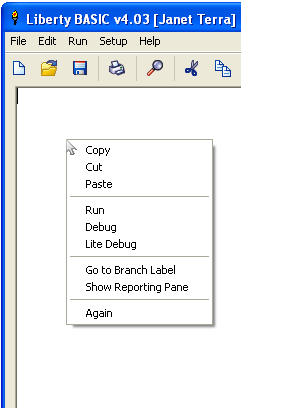
The POPUPMENU Command
The command is POPUPMENU . POPUPMENU is case-insensitive , meaning you can write POPUPMENU or popupmenu or Popupmenu or any other combination of upper and lower case letters. The code for popup windows comes after the window is opened. In fact, a popup menu is not dependent upon a window being opened at all. The POPUPMENU command is followed by the listed item and place of execution.
INPUT "See a popup menu? ";yn$POPUPMENU , the command
IF INSTR(UPPER$(yn$), "Y") > 0 THEN
POPUPMENU "Selection 1", [sel1], "Selection 2", [sel2]
END IF
END
[sel1]
NOTICE "Selection 1";Chr$(13);"You chose the first item."
END
[sel2]
NOTICE "Selection 2";Chr$(13);"You chose the second item."
END
"Selection 1" , the first listing of the popup menu
[sel1] , the block of code to be executed if Selection 1 is clicked
"Selection 2" , the second listing of the popup menu
[sel2] , the block of code to be executed if Selection 2 is clicked
The advantage of a context menu is that the menu is brought to the mouse cursor, eliminating the need for the mouse to travel to the stationary menu bar. This is especially helpful in a program that traps mouseclicks. (For more information on trapping mouse events, see Trapping Mouse Actions and the When Commands. )
 WindowWidth = 400
 WindowHeight = 300

 GRAPHICBOX #main.gb, 0, 0, 400, 300

 OPEN "SpiroDot" for Window as #main
 PRINT #main.gb, "Trapclose [EndProgram]"
 PRINT #main.gb, "Down; Fill Lightgray; Flush"
 PRINT #main.gb, "When leftButtonUp [SelColor]"

 WAIT

 [SelColor]
 xVar = MouseX
 yVar = MouseY
 POPUPMENU "Red", [col1], "Blue", [col2], "Yellow", [col3]
 WAIT

 [col1]
 PRINT #main.gb, "Color Red; Backcolor Red"
 PRINT #main.gb, "Place ";xVar;" ";yVar
 PRINT #main.gb, "Circlefilled 10"
 PRINT #main.gb, "Flush"
 WAIT

 [col2]
 PRINT #main.gb, "Color Blue; Backcolor Blue"
 PRINT #main.gb, "Place ";xVar;" ";yVar
 PRINT #main.gb, "Circlefilled 10"
 PRINT #main.gb, "Flush"
 WAIT

 [col3]
 PRINT #main.gb, "Color Yellow; Backcolor Yellow"
 PRINT #main.gb, "Place ";xVar;" ";yVar
 PRINT #main.gb, "Circlefilled 10"
 PRINT #main.gb, "Flush"
 WAIT

 [EndProgram]
 CLOSE #main
 END
| Popup menus can be used to confirm user action. Again, the advantage is the proximity of the popup menu to the mouse cursor. | 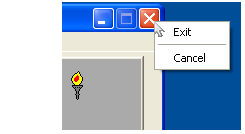 |
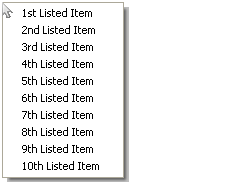
Menu Listings
 POPUPMENU "1st Listed Item", [BranchTo1], "2nd Listed Item", [BranchTo2], "3rd Listed Item", _
 [BranchTo3], "4th Listed Item", [BranchTo4], "5th Listed Item", [Branchto5], "6th Listed Item", _
 [BranchTo6], "7th Listed Item", [BranchTo7], "8th Listed Item", [BranchTo8], "9th Listed Item", _
 [BranchTo9], "10th Listed Item", [BranchTo10]
Menu Separators
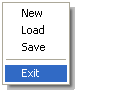
POPUPMENU "New", [newFile], "Load", [loadFile], "Save", [saveFile],|, "Exit", [EndProgram]
| Similar menu items can be grouped by inserting a menu separator (horizontal) line. Instead of a listing and its associated branch label, insert a pipe | . | 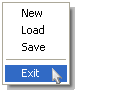 |
Accelerator or 'Hot Key' Selection
Branch Events and Subs
Menu selection directs the code execution to the area specified by the branch label. The SpiroDot program uses branch labels to direct code execution. The POPUPMENU statement must be followed by a WAIT statement to prevent the code from falling through .WindowWidth = 400When code is directed to a branch label, that complete block of code must also end with a WAIT statement. If there is no WAIT statement, code execution will continue through the lines in succession until a WAIT statement is reached, the END statement is reached, or the code encounters an error.
WindowHeight = 300
GRAPHICBOX #main.gb, 0, 0, 400, 300
OPEN "SpiroDot" for Window as #main
PRINT #main.gb, "Trapclose [EndProgram]"
PRINT #main.gb, "Down; Fill Lightgray; Flush"
PRINT #main.gb, "When leftButtonUp [SelColor]"
WAIT
[SelColor]
xVar = MouseX
yVar = MouseY
POPUPMENU "Red", [col1], "Blue", [col2], "Yellow", [col3]
WAIT
[col1]
PRINT #main.gb, "Color Red; Backcolor Red"
PRINT #main.gb, "Place ";xVar;" ";yVar
PRINT #main.gb, "Circlefilled 10"
PRINT #main.gb, "Flush"
WAIT
[col2]
PRINT #main.gb, "Color Blue; Backcolor Blue"
PRINT #main.gb, "Place ";xVar;" ";yVar
PRINT #main.gb, "Circlefilled 10"
PRINT #main.gb, "Flush"
WAIT
[col3]
PRINT #main.gb, "Color Yellow; Backcolor Yellow"
PRINT #main.gb, "Place ";xVar;" ";yVar
PRINT #main.gb, "Circlefilled 10"
PRINT #main.gb, "Flush"
WAIT
[EndProgram]
CLOSE #main
END
A POPUPMENU can not be directed to or call a SUB .
See also Menu Bar.
If you have a favorite Popupmenu or other custom menu you'd like to share, please consider submitting an article.