 RodBird
Feb 24, 2011
RodBird
Feb 24, 2011
Flushing strategies
Rod BirdTable of Contents
Intro
Flush is a command that perplexes quite a few folks. I hope to clarify its use and help you choose the most appropriate drawing and flushing strategy for your project. The Help File is very clearly worded, as you read this document refresh your mind on each of the noted graphics commands.The main purpose of flush is to preserve the drawn graphics so that they may be redrawn instantly should the program window be minimised or covered by another window. If the graphics have not been flushed you will be looking at a blank white window when it is restored or uncovered.
For the more adventurous flush allows multiple graphic scenes to be flicked on and off screen.
The drawing history past and present
Liberty drawing commands do more than paint pixels on the screen, the drawing commands you issue are stored in memory. The commands are recorded sequentially and grouped together in SEGMENTS. You form a segment by issuing a FLUSH command. Realise that this recording is always on. From the moment the program starts and immediately after a flush command, a new CURRENT SEGMENT is in play.Flushed segments are the past, only they will be restored if the screen is minimized or covered by another window. The current segment is the present, drawing will be lost unless flushed into the past or preserved in another way. .
Naming and numbering
Segments are identified by an ever increasing number. The first segment created will be numbered 1, the next 2 and so on. If we delete segments it makes no difference, the next segment will be numbered one higher than the last. Liberty allows us to establish the number of a segment and store that in an appropriate variable name by issuing a SEGMENT name, command.Managing segments
Segments can be deleted with DELSEGMENT (name), redrawn individually with REDRAW (name) or all remaining undeleted segments redrawn with the command REDRAW.Redraw (name) will paint the named segment to the front of the screen, this appears to change the Z order of the drawing. Redraw will appear to restore the Z order and paint all remaining segments in original order.
You can erase all segments by issuing a CLS command. This deletes all segments, and clears the current segment. You can clear the current segment by issuing a DISCARD command.
Decouple the screen in your mind
Only the redraw and cls command have any impact on what you see on the screen, other commands act only on the segments held in memory. Delsegment (name) will have no impact on the screen, discard will have no impact on the screen but the segment (name) will be deleted and the current segment will be wiped clean. Decouple the screen and the drawing history in your mind.Memory management
It is important to mange segments as they consume memory. Even if you don’t use flush it is important to manage the current segment memory with discard.Start with a clean sheet
When you start, start with a clean sheet, use DISCARD. Think what is in your current segment, think what you have flushed already . You might use CLS if you wanted to start completely fresh.

Memory use is zero and there are no forgotten drawing commands.
Static graphics
If you are painting graphics that will not be changed, say a Company logo then simply draw and flush once.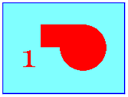 Memory use minimal.
 Animated graphics
If you are painting animated graphics by overdrawing and redrawing repetitively you must manage memory and repetitively DISCARD the current segment. The screen will behave as you expect but unless you DISCARD the current segment history memory use will build.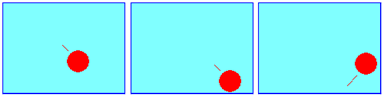 Memory use minimal.
 Background and foreground graphics
If you are going to have a mostly static background and some constantly changing foreground graphics, say sliders or dials then draw the background, FLUSH that as the first segment. You will retain that segment. Now draw and FLUSH the foreground segment. Next time through DELSEGMENT the foreground segment REDRAW the background and then draw and FLUSH the new foreground.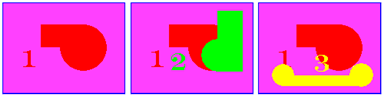 Memory use, two segments max
 .
Multiple segments
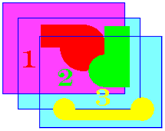
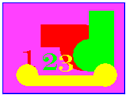
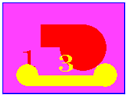
If you want to get fancy you can maintain several segments in memory and change the order they appear on screen. Now most often this strategy will use partial or transparent graphics. By that I mean they will fill only parts of the screen. If you use Fills they will cover graphics behind. The segments are maintained in memory in the Z order they were created.They can be pulled to the front of the screen with REDRAW (name). And appear to change the Z order on screen. If the segment has a full screen fill in it, all graphics will be hidden when that segment is redrawn.
You might choose to do this and have a background segment, in this way you can hide and show any segment you wish.
 Memory use building.