 RodBird
Feb 26, 2011
RodBird
Feb 26, 2011
Flushing strategies Getting to grips with Segments
Rod Bird Table of Contents
Intro
You need to manage segments as
The main purpose of
For the more adventurous,
The drawing history past and present
Liberty drawing commands do more than paint pixels on the screen, the drawing commands you issue are recorded in memory. The commands are recorded sequentially and grouped together inYou need to be aware that this recording is always on. From the moment the program starts and immediately after a flush command, a new
Flushed segments are the past, only they will be restored if the screen is minimized or covered by another window. The current segment is the present, current segment drawing will be lost unless flushed into the past or preserved in another way.
Naming and numbering
Segments are identified by an ever increasing number. The first segment created will be numbered 1, the next 2 and so on.Liberty BASIC allows us to establish the number of
A couple of things catch folk out in naming and numbering. First is that flush both saves the segment
Second thing is that the segmentname system variable is out of scope to the program. It can be used as a literal name in #1.gb "redraw segmentname" and #1.gb "delsegment segmentname" commands but you cannot use it as a program variable. If you establish a program variable of the same name it is an entirely different variable.
Managing segments
Segments can be deleted withRedraw will paint the named segment to the front of the screen, this changes the Z order of the drawing on screen.
You can erase all segments by issuing a
Decouple the screen and drawing history
Only the redraw and cls command have any impact on what you see on the screen, other commands act only on the segments held in memory. Delsegment Manage memory It is important to manage segments as they consume memory. Even if you don’t use flush it is important to manage the current segment memory with discard. Start with a clean sheet
When you start, start with a clean sheet, use ????? is CLS recorded as the first command in a segment????????
 Memory use is zero and there are no forgotten drawing commands.
 'good practice to start with a clean sheet
#1.gb "cls"
'or
#1.gb "discard"
Static graphics
If you are painting graphics that will not be changed,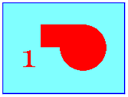 Memory use is managed to one segment.
 'this is the static graphic example
nomainwin
WindowWidth = 600
WindowHeight = 400
UpperLeftX = (DisplayWidth-WindowWidth)/2
UpperLeftY = (DisplayHeight-WindowHeight)/2
graphicbox #1.gb, 50,25,500,300
open "Static Graphic Example" for window_nf as #1
#1 "trapclose [quit]"
'put the pen down and set the font
'note cls has no impact on these settings
#1.gb "down ; font comic_sans 48"
'good practice to start with a clean sheet
#1.gb "cls"
'draw my static graphics
#1.gb "fill cyan ; backcolor red ; color red"
#1.gb "place 100 50 ; boxfilled 300 150"
#1.gb "place 300 150 ; circlefilled 100"
#1.gb "backcolor cyan ; color red"
#1.gb "place 50 100 ;\1"
'now flush the graphics once and once only
#1.gb "flush"
wait
'click on the title bar of the windows and
'slide the window off screen and back,
'the graphics are retained. Rem out the
'flush command and try again.
[quit]
close #1
end
Refreshed graphics
If you are painting fresh graphics, that completely replace the previous graphics, then you must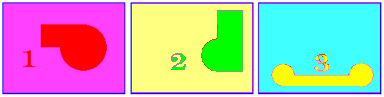 Memory use is managed to one segment.
 'this is the refreshed graphic example, only one segment
'is ever retained in memory.
nomainwin
WindowWidth = 600
WindowHeight = 400
UpperLeftX = (DisplayWidth-WindowWidth)/2
UpperLeftY = (DisplayHeight-WindowHeight)/2
button #1.b, "Draw Graphic", [nextdrawing], UL, 250, 340
textbox #1.tb 350, 340, 100, 25
graphicbox #1.gb, 50,25,500,300
open "Refreshed Graphic Example" for window_nf as #1
#1 "trapclose [quit]"
'put the pen down and set the font
'note cls has no impact on these settings
#1.gb "down ; font comic_sans 48"
'good practice to start with a clean sheet
#1.gb "cls"
drawing=1
wait
[nextdrawing]
'first delete the last segment, it does not matter that
'first time round this loop there isn't a segment to delete
'Liberty will ignore the command
#1.gb "delsegment seg"
'now paint over the last graphics on screen
if drawing=1 then 'draw graphics 1
#1.gb "fill pink ; backcolor red ; color red"
#1.gb "place 100 50 ; boxfilled 300 150"
#1.gb "place 300 150 ; circlefilled 100"
#1.gb "backcolor pink"
#1.gb "place 50 100 ;\1"
end if
if drawing=2 then 'draw graphics 2
#1.gb "fill yellow ; backcolor green ; color green"
#1.gb "place 300 50 ; boxfilled 400 200"
#1.gb "place 300 200 ; circlefilled 100"
#1.gb "backcolor yellow"
#1.gb "place 250 50 ;\2"
end if
if drawing=3 then 'draw graphics 3
#1.gb "fill cyan ; backcolor yellow ; color yellow"
#1.gb "place 100 200 ; boxfilled 350 250"
#1.gb "place 100 200 ; circlefilled 50"
#1.gb "place 350 200 ; circlefilled 50"
#1.gb "backcolor cyan ; color yellow"
#1.gb "place 200 170 ;\3"
end if
drawing=drawing+1
if drawing=4 then drawing=1
'now flush the graphics and store the segment
'number in the variable seg
#1.gb "flush seg"
'The seg variable is catching the segment id and will
'increase everytime through the loop
'print the segment id number for info
'note the name variable "seg" is for internal use.
'to obtain and use the segment number in a variable
'of your own, use segment variablename
'this will provide the current segment number,
'deduct one to get the true number of the last
'flushed segment.
#1.gb "segment currentsegmentnumber"
lastflushed=currentsegmentnumber-1
#1.tb "Seg ID:";lastflushed
wait
[quit]
close #1
end
Animated graphics
If you are painting animated graphics by overdrawing and redrawing repetitively you must manage memory and repetitively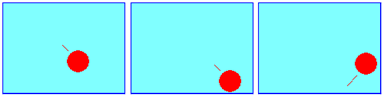 Memory use is minimal.
 nomainwin
WindowWidth = 600
WindowHeight = 400
UpperLeftX = (DisplayWidth-WindowWidth)/2
UpperLeftY = (DisplayHeight-WindowHeight)/2
graphicbox #1.gb, 50,25,500,300
open "Animated Graphic Example" for window_nf as #1
#1 "trapclose [quit]"
#1.gb "down"
x=100
y=100
dx=10
dy=10
timer 17, [draw]
wait
[draw]
'discard the current drawing history
#1.gb "discard"
'overdraw, move and draw the ball
oldx=x
oldy=y
x=x+dx
y=y+dy
if x>475 then x=475 : dx=dx*-.9
if x<25 then x=25 : dx=dx*-.9
if y>275 then y= 275 : dy=dy*-.9
if y<25 then y=25 : dy=dy*-.9
#1.gb "backcolor buttonface ; color buttonface"
#1.gb "place ";oldx;" ";oldy
#1.gb "circlefilled 25"
#1.gb "backcolor red ; color red"
#1.gb "place ";x;" ";y
#1.gb "circlefilled 25"
wait
[quit]
timer 0
close #1
end
Background and foreground graphics
If you are going to have a mostly static background and some constantly changing foreground graphics, say sliders or dials then draw the background,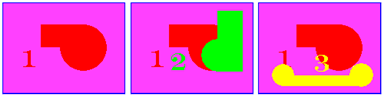 Memory use will not exceed two segments.
 'this is the background graphic example, only two segments
'are ever retained in memory.
nomainwin
WindowWidth = 600
WindowHeight = 400
UpperLeftX = (DisplayWidth-WindowWidth)/2
UpperLeftY = (DisplayHeight-WindowHeight)/2
button #1.b, "Draw Graphic", [nextdrawing], UL, 250, 340
graphicbox #1.gb, 50,25,500,300
open "Refreshed Graphic Example" for window_nf as #1
#1 "trapclose [quit]"
'put the pen down and set the font
'note cls has no impact on these settings
#1.gb "down ; font comic_sans 48"
'good practice to start with a clean sheet
#1.gb "cls"
'draw the background
#1.gb "fill pink ; backcolor red ; color red"
#1.gb "place 100 50 ; boxfilled 300 150"
#1.gb "place 300 150 ; circlefilled 100"
#1.gb "backcolor pink"
#1.gb "place 50 100 ;\1"
'now flush as the named segment "backgroundimage"
#1.gb "flush backgroundimage"
drawing=2
wait
[nextdrawing]
'first delete the last foreground segment, it does not matter that
'first time round this loop it isn't defined
'Liberty will ignore the command
#1.gb "delsegment foregroundimage"
'redraw the background using its segment name
#1.gb "redraw backgroundimage"
'now paint the new foreground image
'notice that the foreground images do not use
'full screen fills.
if drawing=2 then 'draw graphics 2
#1.gb "backcolor green ; color green"
#1.gb "place 300 50 ; boxfilled 400 200"
#1.gb "place 300 200 ; circlefilled 100"
#1.gb "backcolor red"
#1.gb "place 180 120 ;\2"
end if
if drawing=3 then 'draw graphics 3
#1.gb "backcolor yellow ; color yellow"
#1.gb "place 100 200 ; boxfilled 350 250"
#1.gb "place 100 200 ; circlefilled 50"
#1.gb "place 350 200 ; circlefilled 50"
#1.gb "backcolor red ; color yellow"
#1.gb "place 230 170 ;\3"
end if
drawing=drawing+1
if drawing=4 then drawing=2
'now flush the current history as the new foreground segment
'using the foregroundimage name
#1.gb "flush foregroundimage"
wait
[quit]
close #1
end
Multiple segment graphics
If you want to get fancy you can maintain several segments in memory and change the order they appear on screen. Now most often this strategy will use partial or transparent graphics. By that I mean they will fill only parts of the screen. If you use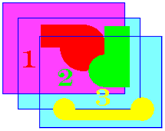
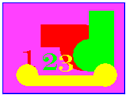
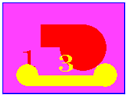
 Memory use builds depending on segments used.