Older Version
Newer Version
 JanetTerra
Sep 9, 2009
JanetTerra
Sep 9, 2009
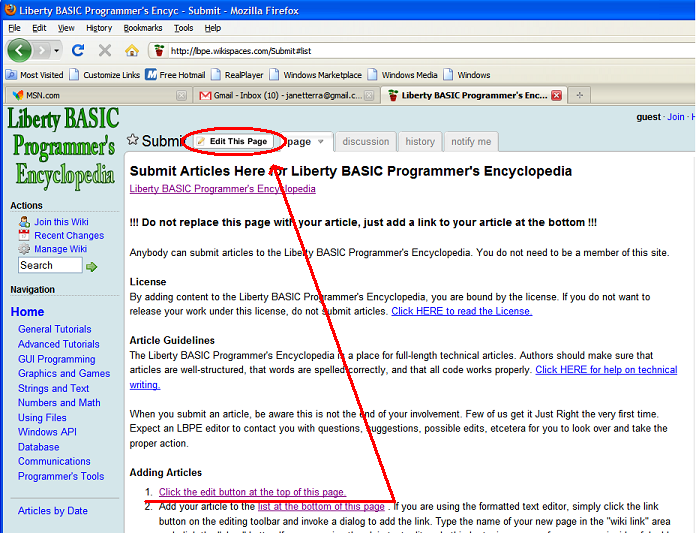
Visual Instructions for Submitting an Article
Note : You must be on the Submit page to carry out these instructions. It may be helpful to have both this page and the Submit page open in two different windows or tabs.
These directions are verbatim from those found on the Submit page.
Adding Articles
- Click the edit button at the top of this page.
- Add your article to the list at the bottom of this page . If you are using the formatted text editor, simply click the link button on the editing toolbar and invoke a dialog to add the link. Type the name of your new page in the "wiki link" area and click the "okay" button.If you are using the plain text editor, do this by typing a name for your page inside of double square brackets. If your article is called "Using Arrays", your link would look like this: * [[Using Arrays]] Save the editing of this page.
- View this page and click on the link you just created.
- On the new page, click the edit link and type or paste your article.
- Please place your name and the date at the top of your article, along with a descriptive title.
- Save your edits. That's all there is to it!