 Alyce
Aug 14, 2006
Alyce
Aug 14, 2006
TABSTRIPS AND CONTAINER CONTROLS
by Alyce Watson - http://alycesrestaurant.com/
- Alyce
Alyce
Once we've done that, we use CreateWindowExA to create the control. You may be asking why we use a "CreateWindow" function to create a control. Both windows and controls are created with this function. We need to establish a struct and some constants for creating and manipulating the control. Liberty BASIC doesn't have true constants. We can mimic them by using variables that we take care not to change within our code. To differentiate them from variables, we type them in uppercase.
We need to get the handle of the program window, and then get its instance handle with GetWindowLongA. The instance handle is needed by the CreateWindowExA function.
We can now create our tabstrip control. We aren't using an extended style flag in this example, so the first argument is passed as "0." We use a class name of "SysTabControl32". This tells the function that we want to creat a tab control. The next argument can be null, since the tab control doesn't have a caption.
The next argument is important. It sets the style flag for the control. The style bits are put together with the bitwise "OR" operator. All controls must have the _WS_CHILD style, since controls are children of the parent window. To make the control visible, we must also include the _WS_VISIBLE flag. _WS_CLIPSIBLINGS clips child windows relative to each other; that is, when a particular child window receives a WM_PAINT message, the WS_CLIPSIBLINGS style clips all other overlapping child windows out of the region of the child window to be updated. If WS_CLIPSIBLINGS is not specified and child windows overlap, it is possible, when drawing within the client area of a child window, to draw within the client area of a neighboring child window. We'll also use the style for multiline tab controls.
The next arguments required by the function set the location and size of the control. These are relative to the client area of the parent window. We also need the handle and instance handle of the parent window. The argument for the menu is null, because tabstrips don't have a menu. The function returns the handle to the tab control.
We now have a control in place, but it doesn't have any tabs! We'll have to send messages to the tab control to add tabs, using the SendMessageA function. This requires that TCITEM struct that we created earlier. We fill the struct with information about the tab to be added. The mask member requires bits to be set that indicate which members of the struct are to be valid in the API call. These bits are for TCIF.TEXT and TCIF.IMAGE. The iImage member is set to -1, since no images will be displayed on the tabs in this demo. The pszText$ member is filled with the desired tab label. The txtMax member is not strictly needed for this function. It would be used to retrieve the tab label, however, so it is placed here for reference. Once the struct is filled, the tab is added by sending the tab control the message TCM.INSERTITEMA. One argument is the index of the tab being added. Remember that indexes are zero-based, so the first tab has an index of 0, the second tab has an index of 1 and so on.
We add additional tabs in exactly the same way. We'll have three tabs in our demo. Here is the way we add the remaining two tabs.
If you had a look at the control right now, you would notice that the font used for the captions of the tabstrips is rather ugly. That is easily fixed. We can get the default gui font on the user's machine with a simple call to GetStockObject. This retrieves the handle to the font, which we then use in SendMessageA with a message of _WM_SETFONT to change the font on the captions.
We need to have some way to know when the user clicks on the tabs so that we can rearrange our tab pages. Liberty BASIC cannot read messages sent from the tab control to the parent window. We can, instead, use a timer to determine which tab has been clicked. We keep track of the current tab and if the selected tab is different from the current tab, we do our changeover routine. We use SendMessageA with a message of TCM.GETCURSEL and the function returns the ID of the tab that is selected.
Demo
Let's set up three dialog_popup windows to act as our three tab pages. We'll put a few controls on each one.
Whenever we want to change the page that is displayed, we can access a subroutine that moves all of the container windows offscreen in a loop. This gives us a blank tab control.
We've wrapped the SetParent and MoveWindow functions in Liberty BASIC functions like so:
- Alyce Jul 21, 2006
by Alyce Watson - http://alycesrestaurant.com/
-
Alyce Tabstrips
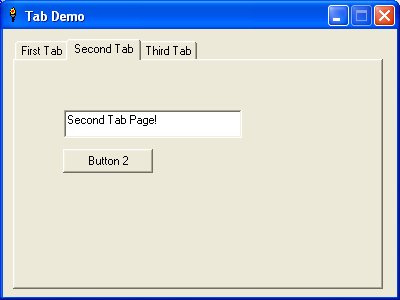
What is a tabstrip? You've probably seen programs that have dialog windows with tabstrip controls. They appear to be a set of index cards, each with a tab at the top. Click a tab and bring the attached card to the front of the pile. Here is one example that shows the second tab card clicked and brought to the front: Let's Make a Tabstrip!
The tabstrip is part of the common control DLL, comctl32.dll. When we want to access the DLL, we must first make a call to initialize it:'initialize DLL
calldll #comctl32, "InitCommonControls", ret as void
Once we've done that, we use CreateWindowExA to create the control. You may be asking why we use a "CreateWindow" function to create a control. Both windows and controls are created with this function. We need to establish a struct and some constants for creating and manipulating the control. Liberty BASIC doesn't have true constants. We can mimic them by using variables that we take care not to change within our code. To differentiate them from variables, we type them in uppercase.
'constants:
TCIF.TEXT = 1
TCIF.IMAGE =2
TCS.MULTILINE = 512
TCM.INSERTITEMA = 4871
TCM.GETCURSEL = 4875
TCM.SETCURSEL = 4876
struct TCITEM,_
mask as ulong,_
dwState as ulong,_
dwStateMask as ulong,_
pszText$ as ptr,_
txtMax as long,_
iImage as long,_
lParam as long
We need to get the handle of the program window, and then get its instance handle with GetWindowLongA. The instance handle is needed by the CreateWindowExA function.
hwndParent = hwnd(#1) 'retrieve window handle
' Get window instance handle
CallDLL #user32, "GetWindowLongA",_
hwndParent As ulong,_ 'parent window handle
_GWL_HINSTANCE As long,_ 'flag to retrieve instance handle
hInstance As ulong 'instance handle
We can now create our tabstrip control. We aren't using an extended style flag in this example, so the first argument is passed as "0." We use a class name of "SysTabControl32". This tells the function that we want to creat a tab control. The next argument can be null, since the tab control doesn't have a caption.
The next argument is important. It sets the style flag for the control. The style bits are put together with the bitwise "OR" operator. All controls must have the _WS_CHILD style, since controls are children of the parent window. To make the control visible, we must also include the _WS_VISIBLE flag. _WS_CLIPSIBLINGS clips child windows relative to each other; that is, when a particular child window receives a WM_PAINT message, the WS_CLIPSIBLINGS style clips all other overlapping child windows out of the region of the child window to be updated. If WS_CLIPSIBLINGS is not specified and child windows overlap, it is possible, when drawing within the client area of a child window, to draw within the client area of a neighboring child window. We'll also use the style for multiline tab controls.
The next arguments required by the function set the location and size of the control. These are relative to the client area of the parent window. We also need the handle and instance handle of the parent window. The argument for the menu is null, because tabstrips don't have a menu. The function returns the handle to the tab control.
' Create control
style = _WS_CHILD or _WS_CLIPSIBLINGS or _WS_VISIBLE _
or TCS.MULTILINE
calldll #user32, "CreateWindowExA",_
0 As long,_ ' extended style
"SysTabControl32" as ptr,_ ' class name
"" as ptr,_ ' title
style as long,_ ' style
10 as long,_ ' left x
10 as long,_ ' top y
370 as long,_ ' width
250 as long,_ ' height
hwndParent as ulong,_ ' parent hWnd
0 as ulong,_ ' menu
hInstance as ulong,_ ' hInstance
"" as ptr,_ ' window creation data - not used
hwndTab as ulong ' tab control handle
We now have a control in place, but it doesn't have any tabs! We'll have to send messages to the tab control to add tabs, using the SendMessageA function. This requires that TCITEM struct that we created earlier. We fill the struct with information about the tab to be added. The mask member requires bits to be set that indicate which members of the struct are to be valid in the API call. These bits are for TCIF.TEXT and TCIF.IMAGE. The iImage member is set to -1, since no images will be displayed on the tabs in this demo. The pszText$ member is filled with the desired tab label. The txtMax member is not strictly needed for this function. It would be used to retrieve the tab label, however, so it is placed here for reference. Once the struct is filled, the tab is added by sending the tab control the message TCM.INSERTITEMA. One argument is the index of the tab being added. Remember that indexes are zero-based, so the first tab has an index of 0, the second tab has an index of 1 and so on.
'set mask and fill struct members:
TCITEM.mask.struct = TCIF.TEXT or TCIF.IMAGE
TCITEM.iImage.struct = -1 'no image
TCITEM.pszText$.struct = "First Tab"
'TCITEM.txtMax.struct=len("First Tab")+1 'used when retrieving text, not needed here
'add first tab:
calldll #user32, "SendMessageA",_
hwndTab as ulong,_
TCM.INSERTITEMA as long,_
0 as long,_ 'zero-based, so 0=first tab
TCITEM as struct,_
ret as long
We add additional tabs in exactly the same way. We'll have three tabs in our demo. Here is the way we add the remaining two tabs.
'add second tab:
TCITEM.pszText$.struct = "Second Tab"
'TCITEM.txtMax.struct=len("Second Tab")+1 'used when retrieving text, not needed here
calldll #user32, "SendMessageA",_
hwndTab as ulong,_
TCM.INSERTITEMA as long,_
1 as long,_ 'zero-based, so 1=second tab
TCITEM as struct,_
ret as long
'add third tab:
TCITEM.pszText$.struct = "Third Tab"
'TCITEM.txtMax.struct=len("Third Tab")+1 'used when retrieving text, not needed here
calldll #user32, "SendMessageA",_
hwndTab as ulong,_
TCM.INSERTITEMA as long,_
2 as long,_ 'zero-based, so 2=third tab
TCITEM as struct,_
ret as long
If you had a look at the control right now, you would notice that the font used for the captions of the tabstrips is rather ugly. That is easily fixed. We can get the default gui font on the user's machine with a simple call to GetStockObject. This retrieves the handle to the font, which we then use in SendMessageA with a message of _WM_SETFONT to change the font on the captions.
calldll #gdi32, "GetStockObject",_
_DEFAULT_GUI_FONT as long, hFont as ulong
'set the font to the control:
CallDLL #user32, "SendMessageA",_
hwndTab As ulong,_ 'tab control handle
_WM_SETFONT As long,_ 'message
hFont As long,_ 'handle of font
1 As long,_ 'repaint flag
ret As long
We need to have some way to know when the user clicks on the tabs so that we can rearrange our tab pages. Liberty BASIC cannot read messages sent from the tab control to the parent window. We can, instead, use a timer to determine which tab has been clicked. We keep track of the current tab and if the selected tab is different from the current tab, we do our changeover routine. We use SendMessageA with a message of TCM.GETCURSEL and the function returns the ID of the tab that is selected.
timer 300, [checkForTab]Now that we know how to create and manage the tab control itself, we'll need to know how to handle the other controls that are to appear on the tab pages. One easy way to do this is to include all needed controls in the window, placing the commands before the "open" statement for the window. Then we'll need to move the correct controls onto the window depending upon which tab is selected, and move all of the others off the window. We can do this with the "locate" command, being sure to "refresh" the window after the controls are moved. This is easy to do, but it requires quite a few lines of code to move each single control every time the user selects a tab. We'll use a different method that simulates "container controls" that are available in some other languages.
'.............
[checkForTab] 'see if selected tab is the same
'as previously selected tab and
'change controls if tab has changed
timer 0 'turn off timer
'get the current tab ID
calldll #user32, "SendMessageA",_
hwndTab as ulong,_ 'tab control handle
TCM.GETCURSEL as long,_ 'message to get current selection
0 as long, 0 as long,_ 'always 0's
tabID as long 'returns selected tab ID
if tabID <> oldTab then 'change page displayed
oldTab = tabID 'for next check of selected tab
gosub [clear]
call MoveWindow winTab(tabID), 20,40,350,210
end if
print #1, "refresh"
timer 300, [checkForTab] 'reactivate timer
wait
Demo
Container Controls
A container control holds other controls. Whenever anything happens to the container, the controls contained upon it are affected as well. Move the container and the child controls move with it. Hide the container and the child controls are also hidden. At first I didn't think we had this capability in Liberty BASIC, but then I remembered that we have a window with style "dialog_popup". This style has no titlebar. We can create a dialog_popup window for each tab and use if for that tab's page. Any controls on this window will move with it, so when we move a container window onto the program window, all of its controls move with it. We only need to make one call to move a control for each tab. We don't have to move each individual control used by the program.Let's set up three dialog_popup windows to act as our three tab pages. We'll put a few controls on each one.
'first pageWe can make a call to SetParent to make our dialog_popup windows children of the main program window. To handle this in a loop, we can get the window handles to these "container" windows and store them in an array.
Statictext #tab1.s1, "First Tab Page!", 145, 75, 180, 30
Button #tab1.b1, "Button 1", [buttonOne], UL, 145, 140, 90, 24
open "" for window_popup as #tab1
'second page
Textbox #tab2.t2, 40, 40, 180, 30
Button #tab2.b2, "Button 2", [buttonTwo], UL, 40, 80, 90, 24
open "" for window_popup as #tab2
'third page
graphicbox #tab3.g, 0, 0, 350, 210
open "" for window_popup as #tab3
hTab1=hwnd(#tab1):hTab2=hwnd(#tab2):hTab3=hwnd(#tab3)
dim winTab(3) 'hold tab window handles in array
winTab(0)=hTab1:winTab(1)=hTab2:winTab(2)=hTab3
'set popups to be children of main program window
for i = 0 to 2
call SetParent hwndParent,winTab(i)
next
Whenever we want to change the page that is displayed, we can access a subroutine that moves all of the container windows offscreen in a loop. This gives us a blank tab control.
[clear] 'hide all windowsOnce the tab control is clear, we can move the desired container window onto it.
for i = 0 to 2
call MoveWindow winTab(i), 3000,3000,350,210
next
return
call MoveWindow hTab1, 20,40,350,210
We've wrapped the SetParent and MoveWindow functions in Liberty BASIC functions like so:
Sub SetParent hWnd,hWndChildThat is just about all we need to know. There is one "gotcha" though. If we include a graphicbox on one of the container windows, we will generate an error when the program ends. To avoid this, we do a GetParent call to get the parent window of the graphicbox. We'll store this handle in a variable for use later. When the program ends, we use SetParent to give the graphicbox its proper parent window again.
CallDLL #user32, "SetParent", hWndChild As uLong,_
hWnd As uLong, result As uLong
style = _WS_CHILD or _WS_VISIBLE
CallDLL #user32, "SetWindowLongA",_
hWndChild As ulong, _GWL_STYLE As long,_
style As Long, r As long
End Sub
Sub MoveWindow hWnd,x,y,w,h
CallDLL #user32, "MoveWindow",hWnd As uLong,_
x As Long, y As Long, w As Long, h As Long,_
1 As Boolean, r As Boolean
End Sub
'because of graphicbox, get parent on third tab window for use later
hTab3Parent=GetParent(hTab3)
'........................
[quit]
timer 0
'because of graphicbox, restore parent to third tab window
call SetParent hTab3Parent, hTab3
close #1:close #tab1:close #tab2:close #tab3:end
'........................
Function GetParent(hWnd)
calldll #user32, "GetParent",hWnd as ulong,_
GetParent as ulong
End Function
TabStrip Demo
-
Alyce Jul 21, 2006 'tab control demo
'use dialog_popup windows to hold controls
'set parent of popups to be main program window
'when tab is clicked, use MoveWindow to move popups on and off
'if a graphicbox is used, use GetParent on popup
'if graphicbox is used, restore parent of popup at close
'doesn't work properly with type window_popup
nomainwin
'constants:
TCIF.TEXT = 1
TCIF.IMAGE =2
TCS.MULTILINE = 512
TCM.INSERTITEMA = 4871
TCM.GETCURSEL = 4875
TCM.SETCURSEL = 4876
tabID = 1 'current tab
oldTab = 0 'previously selected tab
struct TCITEM,_
mask as ulong,_
dwState as ulong,_
dwStateMask as ulong,_
pszText$ as ptr,_
txtMax as long,_
iImage as long,_
lParam as long
 'initialize DLL
 calldll #comctl32, "InitCommonControls", ret as void
WindowWidth=350:WindowHeight=210
'example controls:
'first page
Statictext #tab1.s1, "First Tab Page!", 145, 75, 180, 30
Button #tab1.b1, "Button 1", [buttonOne], UL, 145, 140, 90, 24
open "" for window_popup as #tab1
'second page
Textbox #tab2.t2, 40, 40, 180, 30
Button #tab2.b2, "Button 2", [buttonTwo], UL, 40, 80, 90, 24
open "" for window_popup as #tab2
'third page
graphicbox #tab3.g, 0, 0, 350, 210
open "" for window_popup as #tab3
'main program window
WindowWidth = 400:WindowHeight = 300
open "Tab Demo" for window_nf as #1
print #1, "trapclose [quit]"
print #1, "font ms_sans_serif 10"
#tab2.t2 "Second Tab Page!"
print #tab3.g, "down; fill blue; color white"
print #tab3.g, "backcolor blue"
print #tab3.g, "place 30 50;\Third page!\Click Me!"
print #tab3.g, "flush"
print #tab3.g, "setfocus; when leftButtonDown [mouseClick]"
hwndParent = hwnd(#1) 'retrieve window handle
hTab1=hwnd(#tab1):hTab2=hwnd(#tab2):hTab3=hwnd(#tab3)
dim winTab(3) 'hold tab window handles in array
winTab(0)=hTab1:winTab(1)=hTab2:winTab(2)=hTab3
'because of graphicbox, get parent on third tab window for use later
hTab3Parent=GetParent(hTab3)
'set popups to be children of main program window
for i = 0 to 2
call SetParent hwndParent,winTab(i)
next
'move child windows
gosub [clear]
call MoveWindow hTab1, 20,40,350,210
' Get window instance handle
CallDLL #user32, "GetWindowLongA",_
hwndParent As ulong,_ 'parent window handle
_GWL_HINSTANCE As long,_'flag to retrieve instance handle
hInstance As ulong 'instance handle
' Create control
style = _WS_CHILD or _WS_CLIPSIBLINGS or _WS_VISIBLE _
or TCS.MULTILINE
calldll #user32, "CreateWindowExA",_
0 As long,_ ' extended style
"SysTabControl32" as ptr,_ ' class name
"" as ptr,_
style as long,_ ' style
10 as long,_ ' left x
10 as long,_ ' top y
370 as long,_ ' width
250 as long,_ ' height
hwndParent as ulong,_ ' parent hWnd
0 as long,_
hInstance as ulong,_ ' hInstance
"" as ptr,_
hwndTab as ulong ' tab control handle
 'set mask and fill struct members:
 TCITEM.mask.struct = TCIF.TEXT or TCIF.IMAGE
 TCITEM.iImage.struct = -1 'no image
 TCITEM.pszText$.struct = "First Tab"
 'TCITEM.txtMax.struct=len("First Tab")+1 'used when retrieving text, not needed here

 'add first tab:
 calldll #user32, "SendMessageA",_
 hwndTab as ulong,_
 TCM.INSERTITEMA as long,_
 0 as long,_ 'zero-based, so 0=first tab
 TCITEM as struct,_
 ret as long
 'add second tab:
 TCITEM.pszText$.struct = "Second Tab"
 'TCITEM.txtMax.struct=len("Second Tab")+1 'used when retrieving text, not needed here
 calldll #user32, "SendMessageA",_
 hwndTab as ulong,_
 TCM.INSERTITEMA as long,_
 1 as long,_ 'zero-based, so 1=second tab
 TCITEM as struct,_
 ret as long

 'add third tab:
 TCITEM.pszText$.struct = "Third Tab"
 'TCITEM.txtMax.struct=len("Third Tab")+1 'used when retrieving text, not needed here
 calldll #user32, "SendMessageA",_
 hwndTab as ulong,_
 TCM.INSERTITEMA as long,_
 2 as long,_ 'zero-based, so 2=third tab
 TCITEM as struct,_
 ret as long
calldll #gdi32, "GetStockObject",_
_DEFAULT_GUI_FONT as long, hFont as ulong
'set the font to the control:
CallDLL #user32, "SendMessageA",_
hwndTab As ulong,_ 'tab control handle
_WM_SETFONT As long,_ 'message
hFont As ulong,_ 'handle of font
1 As long,_ 'repaint flag
ret As long
timer 300, [checkForTab]
calldll #user32, "SetFocus",hwndParent as ulong,re as ulong
wait
[quit]
timer 0
'because of graphicbox, restore parent to third tab window
call SetParent hTab3Parent, hTab3
close #1:close #tab1:close #tab2:close #tab3:end
[checkForTab] 'see if selected tab is the same
'as previously selected tab and
'change controls if tab has changed
timer 0 'turn off timer
'get the current tab ID
calldll #user32, "SendMessageA",_
hwndTab as ulong,_ 'tab control handle
TCM.GETCURSEL as long,_ 'message to get current selection
0 as long, 0 as long,_ 'always 0's
tabID as long 'returns selected tab ID
if tabID <> oldTab then 'change page displayed
oldTab = tabID 'for next check of selected tab
gosub [clear]
call MoveWindow winTab(tabID), 20,40,350,210
end if
print #1, "refresh"
timer 300, [checkForTab] 'reactivate timer
wait
[buttonOne]
timer 0
notice "First page."
timer 300, [checkForTab]
wait
[buttonTwo]
timer 0
#tab2.t2 "!contents? txt$"
notice "Textbox contents: ";txt$
timer 300, [checkForTab]
wait
[mouseClick]
timer 0
notice "Mouse clicked on third page."
timer 300, [checkForTab]
wait
 [clear] 'hide all windows
 for i = 0 to 2
 call MoveWindow winTab(i), 3000,3000,350,210
 next
 return
Function GetParent(hWnd)
calldll #user32, "GetParent",hWnd as ulong,_
GetParent as ulong
End Function
Sub SetParent hWnd,hWndChild
CallDLL #user32, "SetParent", hWndChild As uLong,_
hWnd As uLong, result As uLong
style = _WS_CHILD or _WS_VISIBLE
CallDLL #user32, "SetWindowLongA",_
hWndChild As ulong, _GWL_STYLE As long,_
style As Long, r As long
End Sub
Sub MoveWindow hWnd,x,y,w,h
CallDLL #user32, "MoveWindow",hWnd As uLong,_
x As Long, y As Long,w As Long, h As Long,_
1 As Boolean, r As Boolean
End Sub